SF32LB57x Hardware Design Guide — Clock, RF & User Interfaces
Part of the SF32LB57x Hardware Design Guide
This page covers Sections 5.3-5.5 of Schematic Design Guidelines: Clock Generation, RF, and User Interfaces. Return to Minimum System & Power, or continue to Storage & Manufacturing.
5.3. Clock Generation
Clock generation covers the 48 MHz main crystal, the 32.768 kHz RTC crystal, and the calibration conditions that affect RF, Bluetooth, RTC accuracy, and low-power behavior. Keep crystal selection and layout constraints in view during schematic review and PCB placement.
5.3.1. 48 MHz Main Crystal
Recommended parameters:
| Parameter | Recommendation |
|---|---|
| Load capacitance CL | 7 pF to 12 pF, about 8.8 pF recommended |
| Frequency tolerance | <= ±10 ppm |
| ESR | <= 30 ohm, about 22 ohm recommended |
The source guide states that crystal power decreases as CL and ESR decrease. Reserve a parallel matching-capacitor footprint beside the 48 MHz crystal; for a crystal with CL below 12 pF, the source says the capacitor does not need to be populated.
Layout requirements:
- Place the crystal close to the chip pins, preferably inside the shield-can area.
- Keep it away from PA, charger, PMU, DC/DC, battery, and high-speed digital traces.
- Route on the top layer when practical, with a trace width of 0.1 mm and a length of 3 mm to 10 mm. Keep at least 0.15 mm between the
48M_XIand48M_XOtraces, as shown in the source layout figure. - Keep the top-layer crystal keep-out consistent with the reference design and do not route signals under the crystal. The source gives conflicting instructions about ground copper on the adjacent layer; see the note below.
- Use 3D ground shielding, but avoid placing ground too close to the oscillation traces.
The specified 48 MHz crystal load-capacitance range is 7 pF to 12 pF, with about 8.8 pF recommended. Validate the selected crystal against the oscillator circuit on product hardware and confirm the frequency error. Include crystal frequency calibration in production bring-up; do not assume the default software setting is suitable for every crystal.
5.3.2. 32.768 kHz RTC Crystal
Recommended parameters:
| Parameter | Recommendation |
|---|---|
| Load capacitance CL | 7 pF or 11.5 pF (the chip defaults to 11.5 pF; 7 pF requires a register change); 7 pF is recommended for the lowest power |
| Frequency tolerance | <= ±20 ppm |
| ESR | <= 80 kohm, about 38 kohm recommended |
The source guide states that lower CL and ESR reduce crystal power. The 32.768 kHz crystal may use 7 pF or 11.5 pF load capacitance; the source says neither needs an external matching capacitor. For other load-capacitance values, measure the circuit and determine the required matching capacitance.
Layout requirements:
- Place the crystal close to the chip and keep traces short.
- Keep trace width at 0.1 mm and length at or below 10 mm. Maintain at least 0.15 mm between the
32K_XIand32K_XOtraces, as shown in the source layout figure, and add 3D ground shielding. - Keep the top-layer crystal keep-out consistent with the reference design and do not route signals under the crystal. The source gives conflicting instructions about ground copper on the adjacent layer; see the note below.
- Keep the crystal area away from power, RF, USB, SDIO, display clock, and charging noise.
| Crystal | Part Number | Vendor | Key Parameters |
|---|---|---|---|
| 48 MHz | E1SB48E001G00E | Hosonic | F0 = 48.000000 MHz, ΔF/F0 = -6 to +8 ppm, CL = 8.8 pF, ESR <= 22 ohm, TOPR -30 to 85 °C, 2016 package. |
| 32.768 kHz | ETST00327000LE | Hosonic | F0 = 32.768 kHz, ΔF/F0 = -20 to +20 ppm, CL = 7 pF, ESR <= 70 kohm, TOPR -40 to 85 °C, 3215 package. |
| 48 MHz | SX20Y048000B31T-8.8 | TKD | F0 = 48.000000 MHz, ΔF/F0 = -10 to +10 ppm, CL = 8.8 pF, ESR <= 40 ohm, TOPR -20 to 75 °C, 2016 package; higher ESR slightly increases static power consumption. |
| 32.768 kHz | SF32K32768D71T01 | TKD | F0 = 32.768 kHz, ΔF/F0 = -20 to +20 ppm, CL = 7 pF, ESR <= 70 kohm, TOPR -40 to 85 °C, 3215 package. |
| 32.768 kHz | SF32WK32768D71T005 | TKD | F0 = 32.768 kHz, ΔF/F0 = -20 to +20 ppm, CL = 7 pF, ESR <= 70 kohm, TOPR -40 to 85 °C, 3215 package. |
| 48 MHz | CN4048M000885C822000 | JWT | F0 = 48.000000 MHz, ΔF/F0 = -8 to +8 ppm, CL = 8.8 pF, ESR <= 22 ohm, TOPR -30 to 85 °C, 2016 package. |
| 32.768 kHz | DH2032K76807T2719002 | JWT | F0 = 32.768 kHz, ΔF/F0 = -20 to +20 ppm, CL = 7 pF, ESR <= 70 kohm, TOPR -40 to 85 °C, 3215 package. |
The 32.768 kHz crystal CL must match register configuration: for 7 pF, set PMUC->LXT_CR->CAP_SEL = 0; for 11.5 pF, set PMUC->LXT_CR->CAP_SEL = 1. Confirm this setting in firmware before EVT, because the recommended crystal list is mainly 7 pF while some firmware defaults may target a different load-capacitance option.
Conflicting crystal copper guidance in the source
The source guide is inconsistent about copper beneath the crystals: its clock note calls for removing at least the second-layer ground copper; the clock-routing text specifies a keep-out on the adjacent layer; the crystal cross-section figures depict ground copper on L2 beneath the traces; and the stack-up section calls for a continuous L2 ground plane. Do not infer a single rule from these statements. Resolve the layout against the latest approved SF32LB57x reference design before PCB release.
5.3.3. Low-Power Clock Outputs
In Sleep, DeepSleep, Standby, and Hibernate modes, pins PA24 to PA27 can output either the RC10K clock or a 32.768 kHz clock.
In Sleep, DeepSleep, and Standby modes, pins PA24 to PA27 can also output an LPTIM2-generated PWM clock at up to 16 kHz.
5.4. RF
5.4.1. RF Schematic
Key RF schematic requirements:
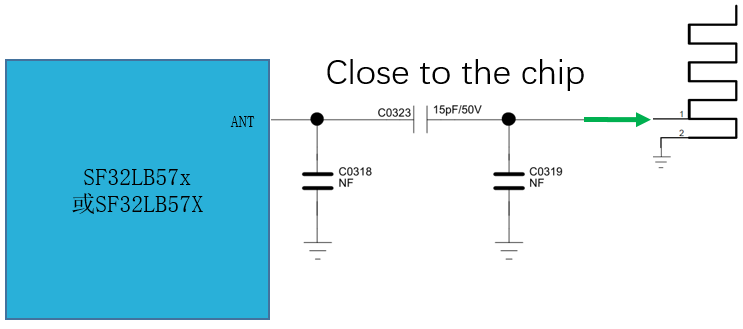
- Reserve a π matching-network footprint in the antenna path for spurious filtering and antenna tuning.
- The reference schematic shows NC shunt-capacitor positions and a 15 pF / 50 V series capacitor. The source prose also says an already impedance-matched antenna needs no additional matching component. Confirm which positions to populate from the antenna design and RF measurements; do not treat the illustrated population as universal.
- Place the matching network near the chip RF pin, not near the antenna end.
- Place the
AVDD_BRFfilter capacitor close to the chip and connect its ground directly to the main ground through nearby vias. - Plan the antenna, matching network, RF ESD, and connector as one signal chain.
5.4.2. RF PCB
PCB requirements:
- Route the RF trace as single-ended 50 ohm.
- Prefer top-layer routing with minimal vias and layer changes.
- Avoid sharp angles and right-angle corners.
- Add ground copper and via fences along both sides.
- Keep a continuous ground reference under the RF trace.
- Keep RF away from DC/DC, crystals, USB, SDIO, display clocks, charger high-current paths, and other noisy regions.
5.4.3. RF Bring-Up and Calibration
Verify RF performance by measurement; correct schematic connectivity is only the starting point.
Recommended RF bring-up items:
- Confirm 48 MHz crystal frequency error and startup stability.
- Use conducted testing to check transmit power, frequency error, receiver sensitivity, and modulation quality.
- Tune the π matching network with the final enclosure, battery, shield can, and antenna placement.
- Verify RF performance while the display is on, charging is active, USB/SDIO/display refresh is running, motor is active, and audio is operating.
- Ensure the production fixture supports crystal calibration, basic RF testing, and firmware download.
Note
Antenna matching should be completed on hardware close to the final product structure. Bare-board matching results usually do not represent final-product RF performance.
5.5. User Interfaces
5.5.1. Display, Touch, and Backlight
Review display, touch, and backlight as one interface group because panel timing, power sequencing, FPC routing, touch wake, ESD, and backlight noise often interact during board bring-up.
5.5.2. Display Interface Selection
SF32LB57x LCDC supports multiple display interface types depending on the exact device.
| Interface | Use Case | Hardware Notes |
|---|---|---|
| SPI / QSPI | Small TFT/AMOLED and wearable displays | Low pin count, limited bandwidth, good for partial refresh. |
| 8080 MCU | Parallel display panels | Higher bandwidth than serial interfaces but uses more pins. |
| RGB / DPI | Medium and high-resolution panels | Continuous pixel stream, strict bandwidth and timing requirements. |
| MIPI DSI | High-density AMOLED | High bandwidth with low pin count, but more complex initialization and signal integrity. |
| EPD | E-paper | Low refresh rate, requires VCOM, PMIC, and waveform planning. |
| JDI | Memory-in-Pixel low-power displays | Good for always-on and sunlight-readable products. |
Common display notes and examples:
- The display controller supports 3-line SPI, 4-line SPI, Dual data SPI, Quad data SPI, 16-bit RGB, 16-bit MCU 8080, 16-bit EPD, and serial/parallel JDI.
- Supported color depths include RGB888, RGB666, RGB565, and RGB111; maximum resolution can reach 1024 x 1024. Confirm the exact modes for the selected device.
- High-resolution projects should review interface bandwidth, display RAM, PSRAM bandwidth, and refresh strategy early.
- If a project does not need a custom pinout, start from an SDK-adapted or reference-design IO group for the selected panel interface. Matrix routing is flexible, but using a software-supported IO group reduces driver and bring-up risk.
- Panel initialization, power sequence, and interface mode must follow the panel vendor datasheet.
| Display Interface | Recommended Starting Point |
|---|---|
| SPI / QSPI | Prefer the dedicated LCDC1_SPI_* pins in the pinmux table. If matrix-mapped LCDC SPI signals are used, keep the display clock at or below 50 MHz and verify drive strength. |
| RGB / DPI | For signals above 30 MHz, use PA22 to PA50 for matrix-mapped LCDC signals; PA52 to PA54 may only be used for B1 to B6. Lower-speed designs may use matrix mapping with timing review. |
| 8080 MCU | Use the same high-speed pin-group rule as RGB/DPI for fast designs; verify bus width, timing, and drive strength against the panel. |
| EPD | Use the same high-speed pin-group rule as RGB/DPI when the EPD bus runs above 30 MHz; also review VCOM and PMIC control pins. |
| JDI | Follow the LCDC JDI signal mapping table and prefer an SDK-adapted panel configuration where available. |
| MIPI DSI | Use the fixed DSI signal assignment from the selected part and reference design; verify lane routing and panel initialization with the software team. |
| Driver | Vendor | Resolution | Type | Typical Interfaces |
|---|---|---|---|---|
| RM69090 | Raydium | 368 x 448 | AMOLED | SPI, Quad SPI, MIPI-DSI |
| RM69330 | Raydium | 454 x 454 | AMOLED | SPI, Quad SPI, 8-bit 8080 MCU, MIPI-DSI |
| ILI8688E | ILITEK | 368 x 448 | AMOLED | Quad SPI, MIPI-DSI |
| SH8601A | Shenghe | 454 x 454 | AMOLED | SPI, Quad SPI, 8-bit 8080 MCU, MIPI-DSI |
| SPD2012 | Solomon | 356 x 400 | TFT | Quad SPI |
| GC9C01 | Galaxycore | 360 x 360 | TFT | Quad SPI |
| GC9B71 | Galaxycore | 320 x 380 | TFT | Quad SPI |
| ST77903 | Sitronix | 400 x 400 | TFT | Quad SPI |
| ICNA3311 | Chipone | 454 x 454 | AMOLED | Quad SPI |
| FT2308 | FocalTech | 410 x 494 | AMOLED | Quad SPI |
The following tables give the exact signal-to-pin mapping for each display interface type. Use the table that matches the selected panel's interface.
| SPI Panel Signal | 57x Signal | Description |
|---|---|---|
CSx |
LCDC1_SPI_CS |
Chip select signal. |
WRx_SCL |
LCDC1_SPI_CLK |
Clock signal. |
DCx |
LCDC1_SPI_DIO1 |
Data/command select signal in 4-wire SPI mode; DATA1 in Quad-SPI mode. |
SDI_RDx |
LCDC1_SPI_DIO0 |
Data input signal in 3/4-wire SPI mode; DATA0 in Quad-SPI mode. |
SDO |
LCDC1_SPI_DIO0 |
Data output signal in 3/4-wire SPI mode; connect this pin to SDI_RDx with a short wire. |
D[0] |
LCDC1_SPI_DIO2 |
DATA2 in Quad-SPI mode. |
D[1] |
LCDC1_SPI_DIO3 |
DATA3 in Quad-SPI mode. |
RESET |
LCDC1_SPI_RSTB |
Reset signal. |
TE |
LCDC1_SPI_TE |
Tearing-effect signal to the MCU. |
Note
Prefer the dedicated LCDC1_SPI_* Function 1 pins. If matrix-mapped SPI-mode signals (Function index 121-150) are used instead, limit the clock to 50 MHz and configure GPIO drive strength as DS1 = 0, DS0 = 1.
| RGB888 Panel Signal | RGB565 Panel Signal | 57x Signal | Description |
|---|---|---|---|
| CLK | CLK | LCDC_DPI_CLK |
Clock signal. |
| DE | DE | LCDC_DPI_DE |
Data-enable signal in DE mode. |
| HSYNC | HSYNC | LCDC_DPI_HSYNC |
Horizontal sync signal. |
| VSYNC | VSYNC | LCDC_DPI_VSYNC |
Vertical sync signal. |
| R0 | - | LCDC_DPI_R0 |
Red data 0. |
| R1 | - | LCDC_DPI_R1 |
Red data 1. |
| R2 | - | LCDC_DPI_R2 |
Red data 2. |
| R3 | R0 | LCDC_DPI_R3 |
Red data 3. |
| R4 | R1 | LCDC_DPI_R4 |
Red data 4. |
| R5 | R2 | LCDC_DPI_R5 |
Red data 5. |
| R6 | R3 | LCDC_DPI_R6 |
Red data 6. |
| R7 | R4 | LCDC_DPI_R7 |
Red data 7. |
| G0 | - | LCDC_DPI_G0 |
Green data 0. |
| G1 | - | LCDC_DPI_G1 |
Green data 1. |
| G2 | G0 | LCDC_DPI_G2 |
Green data 2. |
| G3 | G1 | LCDC_DPI_G3 |
Green data 3. |
| G4 | G2 | LCDC_DPI_G4 |
Green data 4. |
| G5 | G3 | LCDC_DPI_G5 |
Green data 5. |
| G6 | G4 | LCDC_DPI_G6 |
Green data 6. |
| G7 | G5 | LCDC_DPI_G7 |
Green data 7. |
| B0 | - | LCDC_DPI_B0 |
Blue data 0. |
| B1 | - | LCDC_DPI_B1 |
Blue data 1. |
| B2 | - | LCDC_DPI_B2 |
Blue data 2. |
| B3 | B0 | LCDC_DPI_B3 |
Blue data 3. |
| B4 | B1 | LCDC_DPI_B4 |
Blue data 4. |
| B5 | B2 | LCDC_DPI_B5 |
Blue data 5. |
| B6 | B3 | LCDC_DPI_B6 |
Blue data 6. |
| B7 | B4 | LCDC_DPI_B7 |
Blue data 7. |
| LCDC Signal | Mode 0 (RGB565 Conf1) | Mode 1 (RGB565 Conf2) | Mode 2 (RGB565 Conf3) | Mode 3 (RGB666 Conf1) | Mode 4 (RGB666 Conf2) | Mode 5 (RGB888) | Mode 6 (RGB666 over 8-bit) | Mode 7 (RGB888 over 8-bit) |
|---|---|---|---|---|---|---|---|---|
LCDC_IF0 |
B0 | B0 | - | B0 | B0 | B0 | R0/G0/B0 | R0/G0/B0 |
LCDC_IF1 |
B1 | B1 | B0 | B1 | B1 | B1 | R1/G1/B1 | R1/G1/B1 |
LCDC_IF2 |
B2 | B2 | B1 | B2 | B2 | B2 | R2/G2/B2 | R2/G2/B2 |
LCDC_IF3 |
B3 | B3 | B2 | B3 | B3 | B3 | R3/G3/B3 | R3/G3/B3 |
LCDC_IF4 |
B4 | B4 | B3 | B4 | B4 | B4 | R4/G4/B4 | R4/G4/B4 |
LCDC_IF5 |
G0 | - | B4 | B5 | B5 | B5 | R5/G5/B5 | R5/G5/B5 |
LCDC_IF6 |
G1 | - | - | G0 | - | B6 | - | R6/G6/B6 |
LCDC_IF7 |
G2 | - | - | G1 | - | B7 | - | R7/G7/B7 |
LCDC_IF8 |
G3 | G0 | G0 | G2 | G0 | G0 | - | - |
LCDC_IF9 |
G4 | G1 | G1 | G3 | G1 | G1 | - | - |
LCDC_IF10 |
G5 | G2 | G2 | G4 | G2 | G2 | - | - |
LCDC_IF11 |
R0 | G3 | G3 | G5 | G3 | G3 | - | - |
LCDC_IF12 |
R1 | G4 | G4 | R0 | G4 | G4 | - | - |
LCDC_IF13 |
R2 | G5 | G5 | R1 | G5 | G5 | - | - |
LCDC_IF14 |
R3 | - | - | R2 | - | G6 | - | - |
LCDC_IF15 |
R4 | - | - | R3 | - | G7 | - | - |
LCDC_IF16 |
- | R0 | - | R4 | R0 | R0 | - | - |
LCDC_IF17 |
- | R1 | R0 | R5 | R1 | R1 | - | - |
LCDC_IF18 |
- | R2 | R1 | - | R2 | R2 | - | - |
LCDC_IF19 |
- | R3 | R2 | - | R3 | R3 | - | - |
LCDC_IF20 |
- | R4 | R3 | - | R4 | R4 | - | - |
LCDC_IF21 |
- | - | R4 | - | R5 | R5 | - | - |
LCDC_IF22 |
- | - | - | - | - | R6 | - | - |
LCDC_IF23 |
- | - | - | - | - | R7 | - | - |
LCDC_IF24 through LCDC_IF29 are unused in every RGB mode.
| MCU8080 16-bit Panel Signal | MCU8080 8-bit Panel Signal | 57x Signal | Description |
|---|---|---|---|
CSX |
CSX |
LCDC_8080_CS |
Chip select. |
WR |
WR |
LCDC_8080_WR |
Write strobe signal to write data. |
DC |
DC |
LCDC_8080_DC |
Display data/command selection. |
RD |
RD |
LCDC_8080_RD |
Read strobe signal. |
D[0] |
D[0] |
LCDC_8080_DIO0 |
Data 0. |
D[1] |
D[1] |
LCDC_8080_DIO1 |
Data 1. |
D[2] |
D[2] |
LCDC_8080_DIO2 |
Data 2. |
D[3] |
D[3] |
LCDC_8080_DIO3 |
Data 3. |
D[4] |
D[4] |
LCDC_8080_DIO4 |
Data 4. |
D[5] |
D[5] |
LCDC_8080_DIO5 |
Data 5. |
D[6] |
D[6] |
LCDC_8080_DIO6 |
Data 6. |
D[7] |
D[7] |
LCDC_8080_DIO7 |
Data 7. |
D[8] |
- | LCDC_8080_DIO8 |
Data 8 (16-bit mode only). |
D[9] |
- | LCDC_8080_DIO9 |
Data 9 (16-bit mode only). |
D[10] |
- | LCDC_8080_DIO10 |
Data 10 (16-bit mode only). |
D[11] |
- | LCDC_8080_DIO11 |
Data 11 (16-bit mode only). |
D[12] |
- | LCDC_8080_DIO12 |
Data 12 (16-bit mode only). |
D[13] |
- | LCDC_8080_DIO13 |
Data 13 (16-bit mode only). |
D[14] |
- | LCDC_8080_DIO14 |
Data 14 (16-bit mode only). |
D[15] |
- | LCDC_8080_DIO15 |
Data 15 (16-bit mode only). |
RESET |
RESET |
LCDC_8080_RSTB |
Reset. |
TE |
TE |
LCDC_8080_TE |
Tearing-effect signal to the MCU. |
| EPD 16-bit Panel Signal | EPD 8-bit Panel Signal | 57x Signal | Description |
|---|---|---|---|
CLK |
CLK |
LCDC_TCON_SDCLK |
Clock source driver. |
CKV/CPV |
CKV/CPV |
LCDC_TCON_GDCLK |
Clock gate driver. |
SPH |
SPH |
LCDC_TCON_SDSTL |
Start-pulse source driver. |
SPV/STV |
SPV/STV |
LCDC_TCON_GDSP |
Start-pulse gate driver. |
LE |
LE |
LCDC_TCON_SDLE |
Latch-enable source driver. |
OE |
OE |
LCDC_TCON_SDOE |
Output-enable source driver. |
D0 |
D0 |
LCDC_TCON_SDAT0 |
Data signal source driver bit 0. |
D1 |
D1 |
LCDC_TCON_SDAT1 |
Data signal source driver bit 1. |
D2 |
D2 |
LCDC_TCON_SDAT2 |
Data signal source driver bit 2. |
D3 |
D3 |
LCDC_TCON_SDAT3 |
Data signal source driver bit 3. |
D4 |
D4 |
LCDC_TCON_SDAT4 |
Data signal source driver bit 4. |
D5 |
D5 |
LCDC_TCON_SDAT5 |
Data signal source driver bit 5. |
D6 |
D6 |
LCDC_TCON_SDAT6 |
Data signal source driver bit 6. |
D7 |
D7 |
LCDC_TCON_SDAT7 |
Data signal source driver bit 7. |
D8 |
D8 |
LCDC_TCON_SDAT8 |
Data signal source driver bit 8. |
D9 |
- | LCDC_TCON_SDAT9 |
Data signal source driver bit 9 (16-bit mode only). |
D10 |
- | LCDC_TCON_SDAT10 |
Data signal source driver bit 10 (16-bit mode only). |
D11 |
- | LCDC_TCON_SDAT11 |
Data signal source driver bit 11 (16-bit mode only). |
D12 |
- | LCDC_TCON_SDAT12 |
Data signal source driver bit 12 (16-bit mode only). |
D13 |
- | LCDC_TCON_SDAT13 |
Data signal source driver bit 13 (16-bit mode only). |
D14 |
- | LCDC_TCON_SDAT14 |
Data signal source driver bit 14 (16-bit mode only). |
D15 |
- | LCDC_TCON_SDAT15 |
Data signal source driver bit 15 (16-bit mode only). |
GMODE |
GMODE |
Any GPIO | Output-mode selection for the gate driver. |
VPOS |
VPOS |
- | EPD PMIC signal; positive power supply for the source driver. |
VNEG |
VNEG |
- | EPD PMIC signal; negative power supply for the source driver. |
VGH |
VGH |
- | EPD PMIC signal; positive power supply for the gate driver. |
VGL |
VGL |
- | EPD PMIC signal; negative power supply for the gate driver. |
VCOM |
VCOM |
- | EPD PMIC signal; common electrode connection. |
WAKEUP |
WAKEUP |
Any GPIO | EPD PMIC wake-up. |
PWRUP |
PWRUP |
Any GPIO | EPD PMIC power-up. |
I2C_SDA |
I2C_SDA |
Any GPIO | EPD PMIC I2C data. |
I2C_SCL |
I2C_SCL |
Any GPIO | EPD PMIC I2C clock. |
PWRCOM |
PWRCOM |
Any GPIO | EPD PMIC VCOM_CTRL; VCOM enable. |
GOOD |
GOOD |
Any GPIO | EPD PMIC power-good output. |
| Parallel JDI Panel Signal | 57x Signal | Description |
|---|---|---|
VST/GSP |
LCDC_JDI_VST |
Start signal for the vertical driver. |
ENB/GEN |
LCDC_JDI_ENB |
Write-enable signal for the pixel memory. |
FRP/VA |
#LPTIM2_OUTB |
Liquid-crystal drive signal ("off" pixel). |
HST/BSP |
LCDC_JDI_HST |
Start signal for the horizontal driver. |
R1 |
LCDC_JDI_R1 |
Red image data (odd pixels). |
G1 |
LCDC_JDI_G1 |
Green image data (odd pixels). |
B1 |
LCDC_JDI_B1 |
Blue image data (odd pixels). |
VCOM |
#LPTIM2_OUT |
Common electrode drive signal. |
B2 |
LCDC_JDI_B2 |
Blue image data (even pixels). |
G2 |
LCDC_JDI_G2 |
Green image data (even pixels). |
R2 |
LCDC_JDI_R2 |
Red image data (even pixels). |
HCK/BCK |
LCDC_JDI_HCK |
Shift clock for the horizontal driver. |
XFRP/VB |
#LPTIM2_OUT |
Liquid-crystal drive signal ("on" pixel). |
XRST/INTB |
LCDC_JDI_XRST |
Reset signal for the horizontal and vertical driver. |
VCK/GCK |
LCDC_JDI_VCK |
Shift clock for the vertical driver. |
| Serial JDI Panel Signal | 57x Signal | Description |
|---|---|---|
SCLK |
LCDC_JDI_SCLK |
Serial clock signal. |
SI |
LCDC_JDI_SO |
Serial data input signal. |
SCS |
LCDC_JDI_SCS |
Chip select signal. |
EXTCOMIN |
LCDC_JDI_EXTCOMIN |
COM inversion polarity input. |
DISP |
LCDC_JDI_DISP |
Display on/off switching signal. |
Note
RGB, MCU8080, and EPD GPIO selection: at signal rates below 30 MHz, any pin may be configured for the corresponding LCDC signal. Above 30 MHz, matrix-mapped LCDC signals must use PA22 to PA50; PA52 to PA54 may only carry B1 to B6. Configure GPIO drive strength as DS1 = 0, DS0 = 1 in all cases.
| CTP Panel Signal | 57x Signal | Description |
|---|---|---|
| Interrupt | Any GPIO | Touch-status interrupt signal (wake-capable). |
I2C1_SCL |
Any GPIO | Touch-screen I2C clock signal. |
I2C1_SDA |
Any GPIO | Touch-screen I2C data signal. |
BL_PWM |
Any GPIO | Backlight PWM control signal. |
| Reset | Any GPIO | Reset signal. |
5.5.3. Display and Touch Guidelines
- Control display and backlight power independently; default to off at power-up unless the product requires otherwise.
- For high-speed display clocks, reserve a series resistor and optional NC shunt capacitor footprint for EMI tuning.
- Keep FPC, display connector, and touch traces away from the RF antenna area.
- Connect touch INT to a wake-capable GPIO if touch wake is required.
- Match display, touch IC, and MCU IO voltage domains.
- Add ESD protection for display and touch interfaces where exposed to the outside world.
- Prefer dedicated pin groups for SPI/QSPI display signals. For RGB, 8080, EPD, and other high-speed parallel interfaces, choose pin groups suitable for high-speed output and preserve timing consistency in layout.
- When SPI/QSPI uses matrix routing, limit the clock to 50 MHz or below and configure GPIO drive strength as
DS1 = 0, DS0 = 1. - For RGB, MCU8080, and EPD signals above 30 MHz, prefer matrix routing on
PA22toPA50;PA52toPA54may only carryB1toB6.
5.5.4. Display Bring-Up Sequence
Bring up the display in stages to avoid too many variables at once:
- Verify display power, reset, backlight/enable, and panel ID readback.
- Light solid colors at the lowest stable interface speed; confirm RGB order, color depth, and scan direction.
- Verify partial refresh windows, TE signal, frame synchronization, or command/video mode behavior.
- Increase interface speed gradually, then add LVGL, ePicasso, DMA, and backlight dimming.
- Finally validate sleep, wake, screen-off, screen-on, charger insertion/removal, and Bluetooth-connected operation.
For snow, tearing, wrong colors, or intermittent refresh failures, check panel initialization, interface timing, pixel format, refresh window, cache coherency, and FPC signal integrity first.
5.5.5. Audio
Review audio as one noise-sensitive subsystem: microphone bias, audio references, analog inputs, DAC outputs, digital audio clocks, external PA control, and enclosure acoustics should be checked together.
SF32LB57x provides two analog ADC inputs, each supporting single-ended or differential input; one differential analog DAC output that requires an external PA to drive a speaker or headphone; and two PDM microphone interfaces that support up to four digital microphones in total.
5.5.6. Analog Audio Input
Guidelines:
- Place MIC_BIAS, AUD_VREF, and AVDD33_AUD decoupling capacitors close to the chip.
- Add a DC-blocking capacitor for analog microphone input; 2.2 uF or larger is recommended.
- Place analog input components close to the chip pins.
- Keep ADCP and other analog traces short, shielded, and away from noise sources.
- When a multiplexed GPIO is used as analog input, configure the pin as high impedance as required.
| Audio Signal | 57x Signal / Pin | Notes |
|---|---|---|
MIC_BIAS |
PA56 |
Microphone bias supply. |
ADC1P |
PA55 |
Single-ended microphone input or differential positive input. |
ADC1N |
PA09 |
Differential negative input. |
ADC2P |
PA10 |
Single-ended microphone input or differential positive input. |
ADC2N |
PA11 |
Differential negative input. |
PDM1_CLK / PDM1_DATA |
Any GPIO through matrix routing | Clock and data for PDM interface 1. |
PDM2_CLK / PDM2_DATA |
Any GPIO through matrix routing | Clock and data for PDM interface 2. |
DAC1P |
DACP |
Positive side of the differential analog audio output. |
DAC1N |
DACN |
Negative side of the differential analog audio output. |
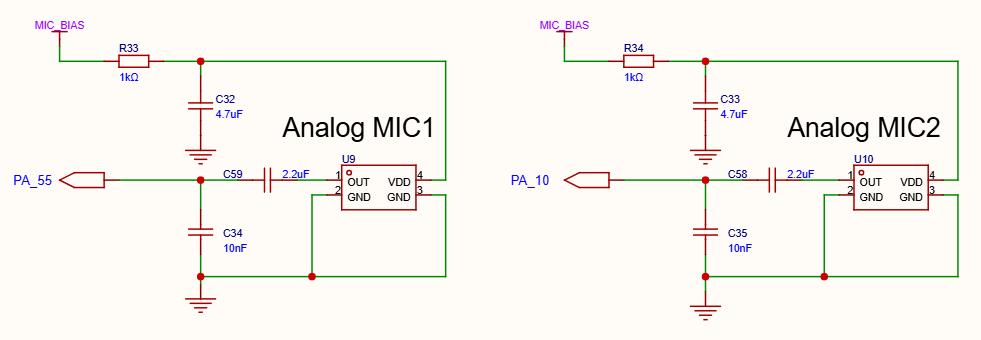
The reference circuit shows each microphone biased through a 1 kohm resistor, with 4.7 uF bias decoupling, a 2.2 uF series input capacitor, and a 10 nF capacitor from the ADC input to ground. These are values in the illustrated reference circuit; verify them for the selected microphone and analog-input design.
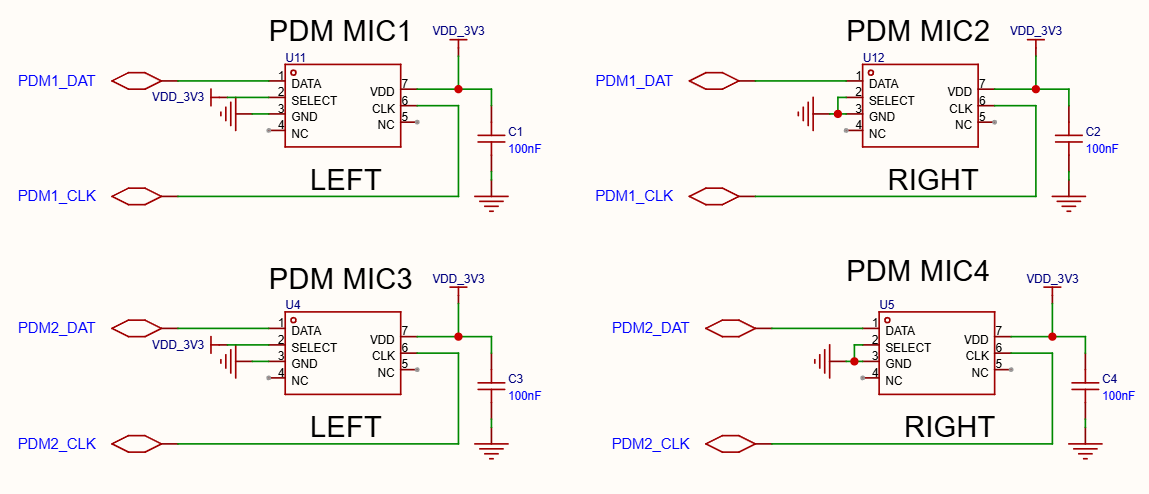
The reference drawing connects two microphones to each PDM interface, sharing that interface's clock and data nets. The microphones' SELECT pins are strapped differently for the left and right channels, and each microphone has a local 100 nF supply-bypass capacitor. The drawing labels the data nets PDM1_DAT and PDM2_DAT, while the signal table uses PDM1_DATA and PDM2_DATA; verify the exact pin/matrix names for the selected device.
5.5.7. Analog Audio Output
Guidelines:
- Route DACP/DACN as a differential pair.
- Keep the pair short, length matched, and away from RF, DC/DC, USB, SDIO, and display clocks.
- Place output RC matching networks close to the chip.
- Keep parasitic capacitance within the audio requirement.
- Keep audio supply and reference paths clean and short.
Follow the recommended circuit in Figure 5.5-3. The differential low-pass filter inside the dashed box must be placed close to the chip pins to suppress high-frequency interference and improve the audio output signal-to-noise ratio.
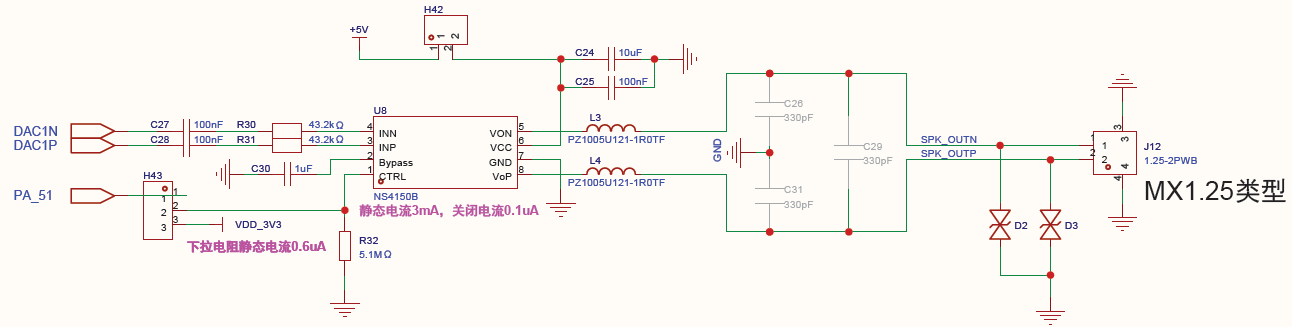
The illustrated NS4150B stage uses a +5 V supply, 100 nF DAC coupling capacitors, 43.2 kohm input resistors, and PA51 for amplifier enable with a 5.1 Mohm pull-down. The drawing annotates 3 mA static current for the amplifier, 0.1 uA in shutdown, and 0.6 uA through the pull-down. Treat these as values for the example circuit, not universal PA specifications, and verify them against the selected amplifier and system requirements.
5.5.8. Digital Audio
For I2S and PDM:
- Match peripheral IO voltage.
- Check clock trace length, crosstalk, and reference ground continuity.
- Review power sequencing for microphones, codec, PA, and MCU.
- Ensure digital audio peripherals enter a safe state during sleep.
5.5.9. Audio Validation
Audio issues often involve hardware, enclosure, software gain, and power noise at the same time. Validate:
- Idle noise, recording noise, playback noise, and noise during charging.
- Crosstalk while the display refreshes, Bluetooth transmits, motor vibrates, USB is attached, and SDIO is active.
- Microphone bias voltage, DC-blocking capacitor polarity/capacity, and input common-mode range.
- DACP/DACN differential output level, load matching, and external PA input range.
- PDM/I2S clock frequency, channel mapping, and sample-rate configuration.
5.5.10. Camera
The camera interface supports DVP up to 16 bits, 2-data-line SPI, and 4-data-line QSPI.
Guidelines:
- Confirm interface width, clock, sync signals, data lines, and pinmux.
- Make camera power, reset, PWDN, and clock controllable by the MCU.
- Keep camera data and clock traces length grouped and away from RF and analog signals.
- Provide continuous reference ground for high-speed camera routing.
- Add ESD protection for the camera connector or FPC where required.
Recommended camera bring-up sequence:
- Confirm camera power, reset, PWDN, MCLK, and I2C/SPI control path first.
- Read the sensor ID and verify the initialization table and output format.
- Use a low-resolution, low-frame-rate mode to validate PCLK, VSYNC, HSYNC/HREF, and data-line mapping.
- Increase resolution and frame rate only after the basic path is stable, then test together with display refresh, storage writes, and Bluetooth connection.
| GC032A SPI4 | GC032A DVP8 | GC2145 DVP8 | OV2640 DVP10 | 57x Signal | Description |
|---|---|---|---|---|---|
SBDA |
SBDA |
SIO-D |
SIO-D |
Any GPIO | I2C data signal. |
SBCL |
SBCL |
SIO-C |
SIO-C |
Any GPIO | I2C clock signal. |
RESET |
RESET |
RESET |
RESET |
Any GPIO | Reset signal output. |
| NC | VSYNC |
VSYNC |
VSYNC |
DCMI_VSYNC |
Vertical sync signal input. |
PWDN |
PWDN |
PWDN |
PWDN |
Any GPIO | Power-down signal (active high) output. |
| NC | HSYNC |
HREF |
HREF |
DCMI_HSYNC |
Horizontal sync signal input. |
| NC | D7 |
D7 |
Y9 |
DCMI_DI7 |
YUV/RGB video port bit [7] input. |
MCLK |
MCLK |
MCLK |
MCLK |
Any GPIO (GPTIM) | System clock output. |
| NC | D6 |
D6 |
Y8 |
DCMI_DI6 |
YUV/RGB video port bit [6] input. |
| NC | D5 |
D5 |
Y7 |
DCMI_DI5 |
YUV/RGB video port bit [5] input. |
SCK |
PCLK/SCK |
PCLK |
PCLK |
DCMI_CLK |
Pixel clock input. |
| NC | D4 |
D4 |
Y6 |
DCMI_DI4 |
YUV/RGB video port bit [4] input. |
SD0 |
D0 |
D0 |
Y2 |
DCMI_DI0 |
YUV/RGB video port bit [0] input. |
SD3 |
D3 |
D3 |
Y5 |
DCMI_DI3 |
YUV/RGB video port bit [3] input. |
SD1 |
D1 |
D1 |
Y3 |
DCMI_DI1 |
YUV/RGB video port bit [1] input. |
SD2 |
D2 |
D2 |
Y4 |
DCMI_DI2 |
YUV/RGB video port bit [2] input. |
| NC | NC | NC | Y1 |
NC | Not connected for this sensor. |
| NC | NC | NC | Y0 |
NC | Not connected for this sensor. |
For 10-bit DVP cameras, use 8-bit wiring when GPIO resources are tight; connect all data bits only when the design has enough GPIO margin.
5.5.11. Buttons and Motor
- The power/reset key must use
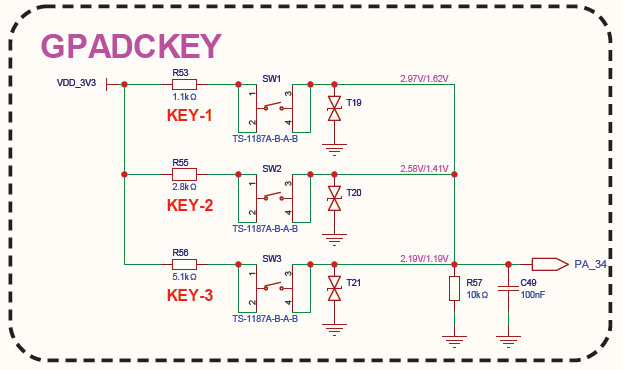
PA34, active-high; the pin is pulled low by default and goes high when pressed.PA34supports a 10-second long-press hardware reset, and the 10 kohm pull-down resistor must be placed on the main board. - For resistor-divider GPADC key designs, distinguish keys by divider voltage and place a 0.1 uF-to-ground filter capacitor close to the pin to improve sampling accuracy.
- The reference ladder shows 1.1 kohm, 2.8 kohm, and 5.1 kohm key resistors, plus a 10 kohm pull-down and a 100 nF filter capacitor. Use these as reference-circuit values and verify the ADC thresholds for the chosen supply and resistor tolerances.
- Add ESD protection for external keys.
Use the SF32LB57x vibration-motor reference circuit when implementing haptic feedback. The motor supply should be switchable in low-power products, and the PWM/control pin should not conflict with boot, display, storage, or debug requirements.
Last updated: