SF32LB52-DevKit-Nano
Overview
The SF32LB52-DevKit-Nano is a small SF32LB52x development board for compact prototypes and embedded evaluation. It uses castellated half-holes around the board edge, making it suitable both as a stand-alone development board and as a solder-down module in early product prototypes.
The board measures 51mm × 20.32mm and exposes the key SF32LB52x resources needed for GPIO, UART, I2C, SPI, LCD, I2S, GPADC, PWM, USB, and analog audio development.
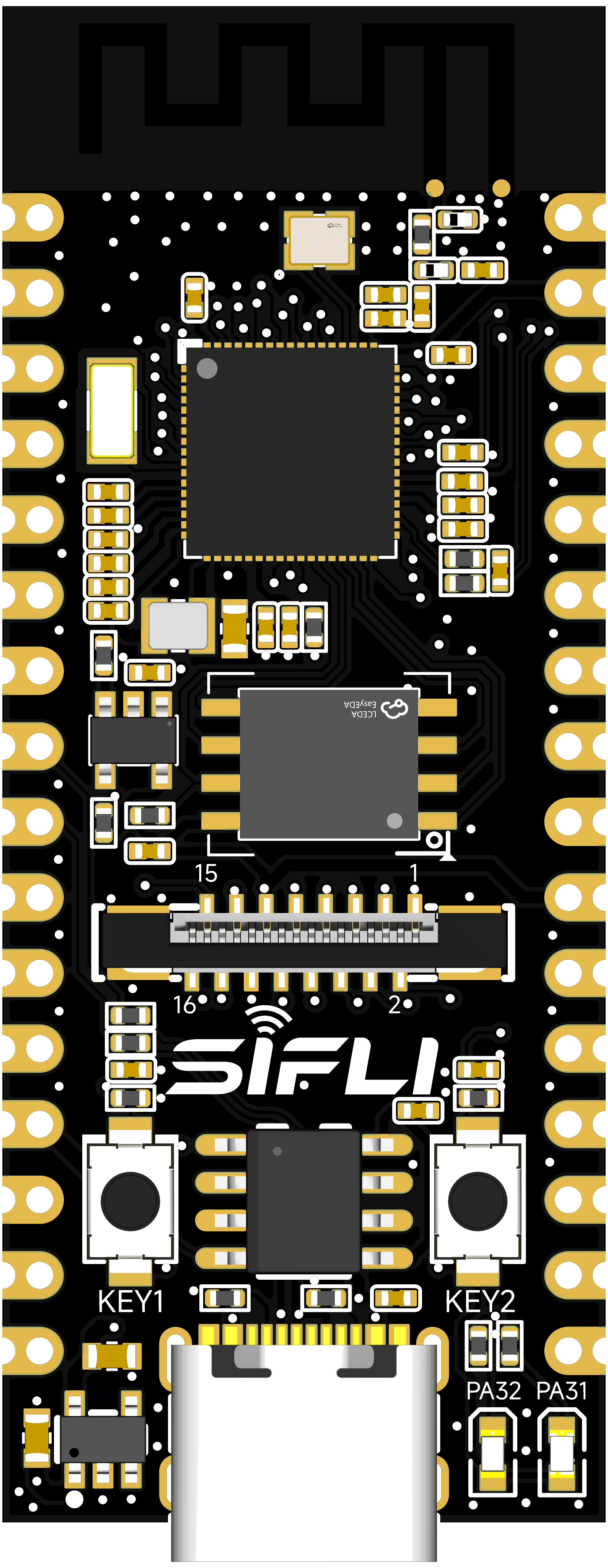
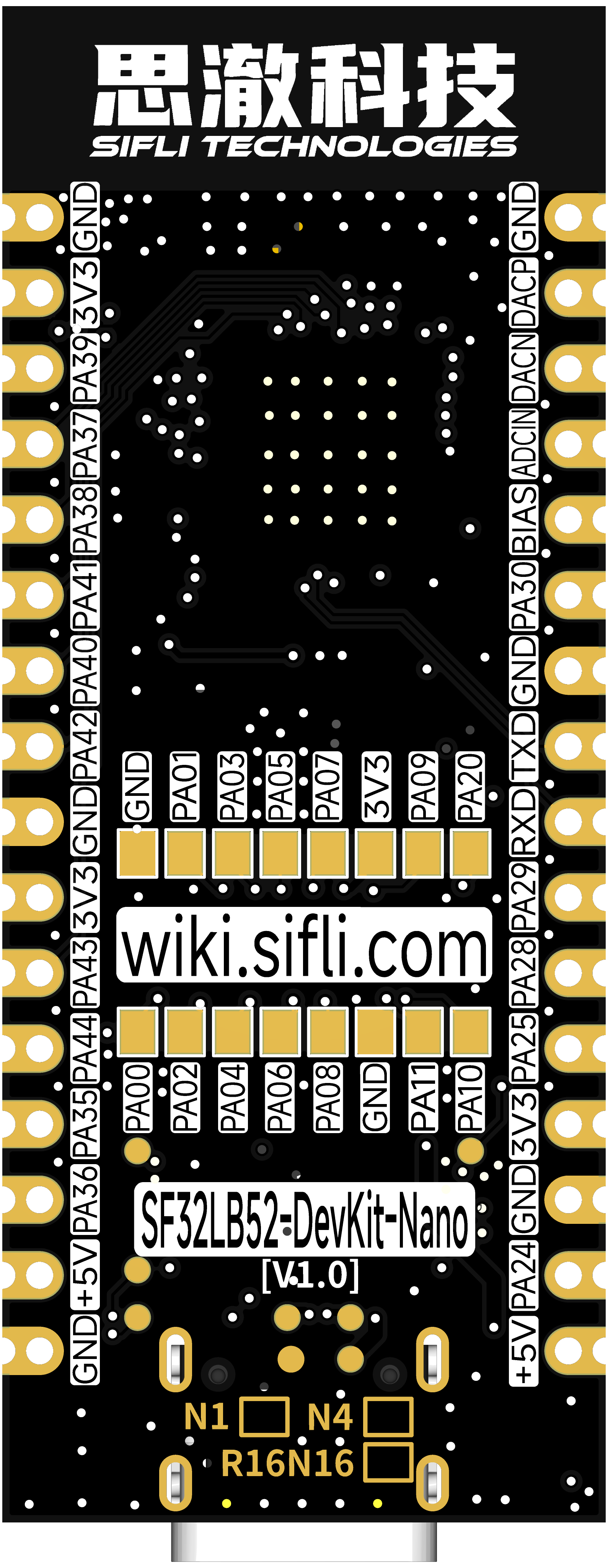
Board Variants
| Variant | MCU | In-Package Memory | External Flash |
|---|---|---|---|
| SF32LB52-DevKit-Nano-N4 | SF32LB52BU56 | 4MB SPI NOR Flash | None |
| SF32LB52-DevKit-Nano-N16R16 | SF32LB52JUD6 | 16MB OPI-PSRAM | 16MB QSPI-NOR Flash |
| SF32LB52-DevKit-Nano-A128R16 | SF32LB52JUD6 | 16MB OPI-PSRAM | 128MB QSPI-NAND Flash |
The N4 variant is suitable for compact control, Bluetooth, and simple UI applications. N16R16 pairs 16 MB OPI-PSRAM with 16 MB QSPI-NOR, while A128R16 pairs 16 MB OPI-PSRAM with 128 MB QSPI-NAND. Both suit applications that need larger display assets, external file systems, or a frame buffer or working memory in PSRAM.
Source discrepancy — verify before selection: SiFli's detailed Nano board guide calls its 16 MB OPI-PSRAM + 16 MB NOR configuration R16N16 V1.0.0; the current development-board model guide lists the same memory configuration as N16R16 and separately lists A128R16 with 16 MB OPI-PSRAM + 128 MB QSPI-NAND. The detailed guide does not describe A128R16 specifically. For that SKU, rely on the model-guide listing rather than transferring details from the N16R16 board description. Before choosing firmware or a storage layout, verify the board marking and the current schematic/BOM.
The SiFli sources also differ slightly on the Nano board dimensions: the detailed guide gives 21 × 51 mm, while the model guide specifies 51 × 20.32 mm. The 51 mm side agrees, but the shorter dimension differs by 0.68 mm. This page uses the more precise model-guide value; verify the mechanical drawing for the exact board revision before enclosure or carrier-board design.
Board Highlights
- 51 mm × 20.32 mm compact board
- Castellated half-hole edge layout for solder-down prototypes
- USB Type-C power and USB-to-UART download/debug through CH340N
- GPIO, UART, I2C, SPI, GPADC, PWM, I2S, PDM, and wake-capable pins exposed
- QSPI LCD support through a 16-pin FPC path, typically using a 22-pin-to-16-pin adapter cable
- I2C touch-panel support
- Analog microphone input and differential audio output pins
- USB2.0 FS routed to edge pins
- Two user LEDs
- Power key and function key
When to Use This Board
Choose SF32LB52-DevKit-Nano when the prototype should stay close to a final product form factor.
- Build compact Bluetooth and display prototypes
- Solder the board onto a carrier PCB
- Test product-like pin assignments before custom board design
- Compare NOR-only, QSPI-NOR, and QSPI-NAND configurations with PSRAM
- Bring up LCD, audio, sensor, and USB functions in a small footprint
For easier bench wiring and wider signal breakout, use SF32LB52-DevKit-Core-3p3. For a display-rich board with charger, TF card, microphone, and speaker amplifier, use SF32LB52-DevKit-LCD.
Power
The board supports three power approaches:
- USB Type-C power, recommended for development
- 3.3V input through the 3.3V and GND castellated pins when USB is not connected
- 5V input through the 5V and GND castellated pins when USB is not connected
When USB Type-C is connected, selected 3.3V and 5V pins can be used as outputs. Verify power direction before attaching external circuits.
The board includes a power switch controlled through the CH340N RTS# signal, allowing tool-controlled reset behavior.
Download and Debug
Use the USB Type-C UART interface for firmware download and serial logs.
- Download mode: enable BOOT in the download tool, then power or reset the board.
- Debug/log mode: disable BOOT, then power or reset the board.
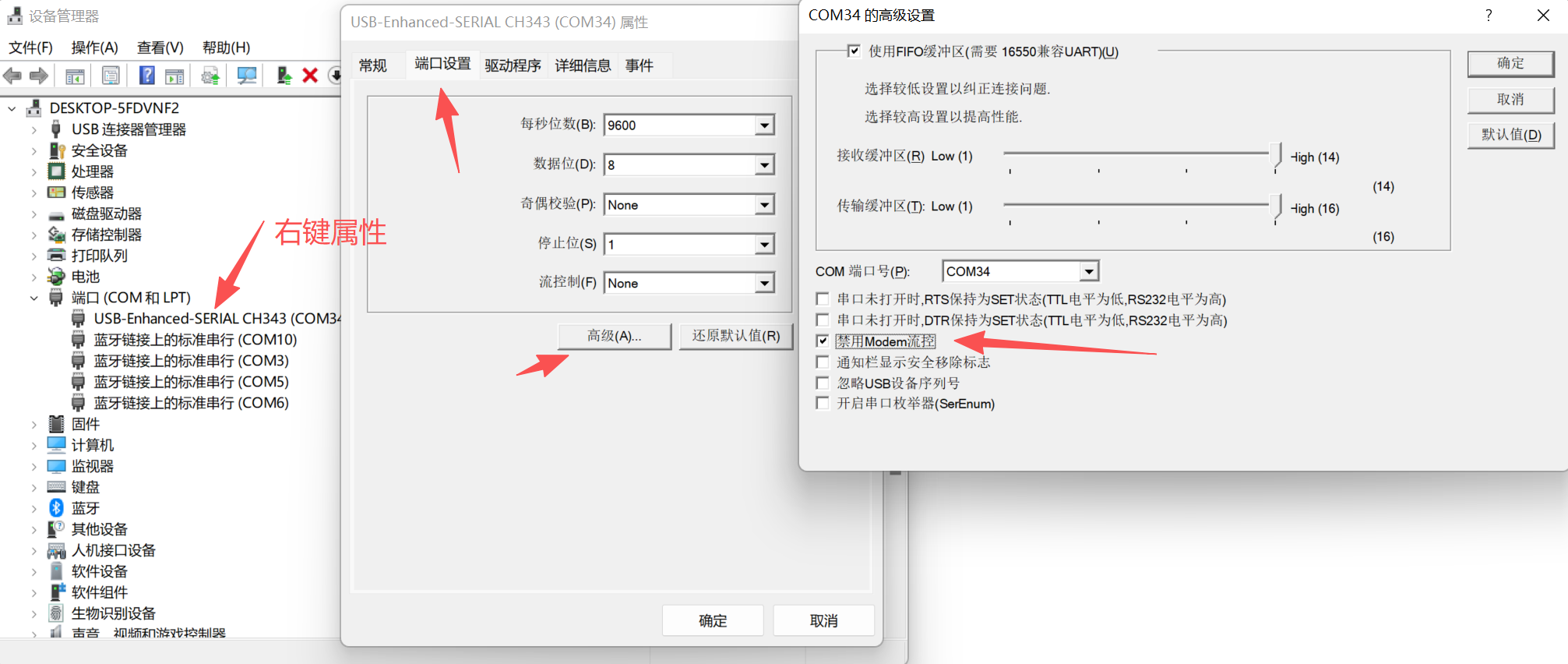
- RTS reset behavior: if opening the serial port unexpectedly resets or powers down the board, disable modem or hardware flow control in the host serial-port settings.
User Controls
| Function | GPIO | Behavior |
|---|---|---|
| LED1 | PA31 | Active low |
| LED2 | PA32 | Active low |
| KEY1 | PA34 | Active high, supports 10s long-press reset |
| KEY2 | PA33 | Active high |
Castellated Pin Summary
The Nano board exposes two edge pin groups. The first group carries audio, SPI1, debug UART, USB-adjacent power, and GPADC-capable pins. The second group carries SPI2, USB FS, wake-capable GPIOs, and power.
Front-Side Edge Signals
| Pin | Signal | Main Function |
|---|---|---|
| 1 | GND | Ground |
| 2 | DACP | Analog audio output |
| 3 | DACN | Analog audio output |
| 4 | MIC_ADC | Analog microphone input |
| 5 | MIC_BIAS | Microphone bias |
| 6 | PA30 | I2S1_LRCK / GPADC2 / UART / I2C |
| 7 | GND | Ground |
| 8 | PA19 | UART0_TXD / SWCLK / debug |
| 9 | PA18 | UART0_RXD / SWDIO / debug |
| 10 | PA29 | SPI1_CS / I2S1_BCK / GPADC1 |
| 11 | PA28 | SPI1_CLK / I2S1_SDI / GPADC0 |
| 12 | PA25 | SPI1_DI / I2S1_SDO / WKUP1 |
| 13 | 3.3V | 3.3V input/output |
| 14 | GND | Ground |
| 15 | PA24 | SPI1_DIO / I2S1_MCLK / WKUP0 |
| 16 | 5V | 5V input/output |
Back-Side Edge Signals
| Pin | Signal | Main Function |
|---|---|---|
| 1 | GND | Ground |
| 2 | 3.3V | 3.3V input/output |
| 3 | PA39 | SPI2_CLK / WKUP15 |
| 4 | PA37 | SPI2_DIO / WKUP13 |
| 5 | PA38 | SPI2_DI / WKUP14 |
| 6 | PA41 | UART / I2C / GPTIM / WKUP17 |
| 7 | PA40 | SPI2_CS / WKUP16 |
| 8 | PA42 | UART / I2C / GPTIM / WKUP18 |
| 9 | GND | Ground |
| 10 | 3.3V | 3.3V input/output |
| 11 | PA43 | UART / I2C / GPTIM / WKUP19 |
| 12 | PA44 | UART / I2C / GPTIM / WKUP20 |
| 13 | PA35 | USB_DP / WKUP11 |
| 14 | PA36 | USB_DM / WKUP12 |
| 15 | 5V | 5V input/output |
| 16 | GND | Ground |
LCD Interface
The board supports QSPI LCD panels through a 16-pin FPC signal set. The original board note describes connection to the Huangshan Pi 1.85-inch AMOLED screen through a 22-pin-to-16-pin FPC cable.

| Pin | Signal | Function |
|---|---|---|
| 1 | GND | Ground |
| 2 | PA00 | LCD reset |
| 3 | PA01 | Backlight PWM |
| 4 | PA02 | LCD TE / I2S1_MCLK |
| 5 | PA03 | LCD CS / I2S1_SDO |
| 6 | PA04 | LCD CLK / I2S1_SDI |
| 7 | PA05 | LCD D0 / I2S1_BCK |
| 8 | PA06 | LCD D1 / I2S1_LRCK |
| 9 | PA07 | LCD D2 / PDM1_CLK |
| 10 | PA08 | LCD D3 / PDM1_DAT |
| 11 | 3.3V | Display power output |
| 12 | GND | Ground |
| 13 | PA09 | Touch interrupt |
| 14 | PA11 | Touch I2C SDA |
| 15 | PA20 | Touch I2C SCL |
| 16 | PA10 | Touch reset |
External Flash and SDIO Pins
The N16R16 variant includes external 16MB QSPI-NOR Flash. The storage pin group is:
| MCU GPIO | Shared Flash / SDIO Function |
|---|---|
| PA12 | MPI2_CS / SD1_D2 |
| PA13 | MPI2_D1 / SD1_D3 |
| PA14 | MPI2_D2 / SD1_CLK |
| PA15 | MPI2_D0 / SD1_CMD |
| PA16 | MPI2_CLK / SD1_D0 |
| PA17 | MPI2_D3 / SD1_D1 |
These pins may be occupied by the mounted Flash depending on the variant. Check the exact board assembly before using them as expansion pins.
Audio Expansion
The Nano board exposes analog microphone input, microphone bias, and differential analog audio output. Add an external microphone circuit and audio power amplifier as required by the target product.
SDK Build Targets
The SiFli SDK uses the following exact board-target names with scons --board=<board_name>:
sf32lb52-nano_n4sf32lb52-nano_n16r16sf32lb52-nano_a128r16
These are SDK build-target identifiers, not necessarily the product names printed on a board or module. The Supported Boards index and the SDK's build_config_gcc.yaml may enumerate different sets; confirm the target against the SDK revision in use.
Related Documents
Last updated: