SF32LB55x Hardware Design Guide
1. Introduction
This hardware design guide provides recommendations and reference material for products based on the SF32LB55x family of general-purpose AIoT microcontrollers. It is intended for hardware engineers, PCB designers, and product developers building BLE wearables, sensor-rich battery-powered products, health-monitoring devices, and compact connected systems.
The guide covers the complete hardware development process, including package selection, power-supply design, clock circuits, RF layout, external memory, display interfaces, wake sources, sensors, audio, debug access, PCB layout, validation, and manufacturing preparation. Following these guidelines helps reduce schematic and layout risk, preserve low-power behavior, and keep the design aligned with SF32LB55x package, power, memory, RF, and interface requirements.
This document assumes a basic understanding of embedded hardware design and schematic capture. It complements the SF32LB55x datasheet, user manual, official hardware application note, reference designs, and SiFli Approved Vendor List. These official sources remain authoritative for electrical specifications, pin multiplexing, package dimensions, component qualification, and production limits.
SF32LB55x uses a legacy suffix convention. For interface availability, package-dependent capability, and exact memory topology, use the exact orderable part number and package reference rather than suffix inference alone.
2. Development Resources
3. Device Overview
3.1. Architecture
SF32LB55x targets low-power AIoT products that must respond quickly to users while keeping standby and sleep power low. It integrates a low-power Bluetooth 5.2 transceiver, power management, and memory and display interfaces. Hardware integration requires package selection, PMU rail design, boot-mode control, two crystal circuits, RF matching, external memory, MIPI/SPI/MCU8080/JDI display selection, GPADC and sensor connections, external Bluetooth audio, debug/flashing access, and production calibration.
Storage connectivity includes multiple QSPI interfaces, an independent OPI-PSRAM interface, and SD/eMMC support. Co-packaged NOR Flash and PSRAM configurations vary by exact part number. Memory and display interfaces also depend on the package: BGA145 supports one external OPI-PSRAM channel, while BGA169 supports two. The two-lane MIPI DSI interface is supported on BGA145 and BGA169, not QFN68L. Confirm the exact part's pin map and co-packaged memory configuration before assigning external devices.
3.2. Variants and Packages
| Package Name | Size | Pin Pitch | Ball Diameter |
|---|---|---|---|
| QFN68L | 7x7x0.75 mm | 0.35 mm | - |
| BGA145 | 7x7x0.94 mm | 0.5 mm | 0.25 mm |
| BGA169 | 7x7x0.94 mm | 0.5 mm | 0.25 mm |
SF32LB55x supports QFN68L, BGA145, and BGA169 packages. Select the package early because memory interfaces, fanout, PCB process requirements, and available GPIO differ by package.
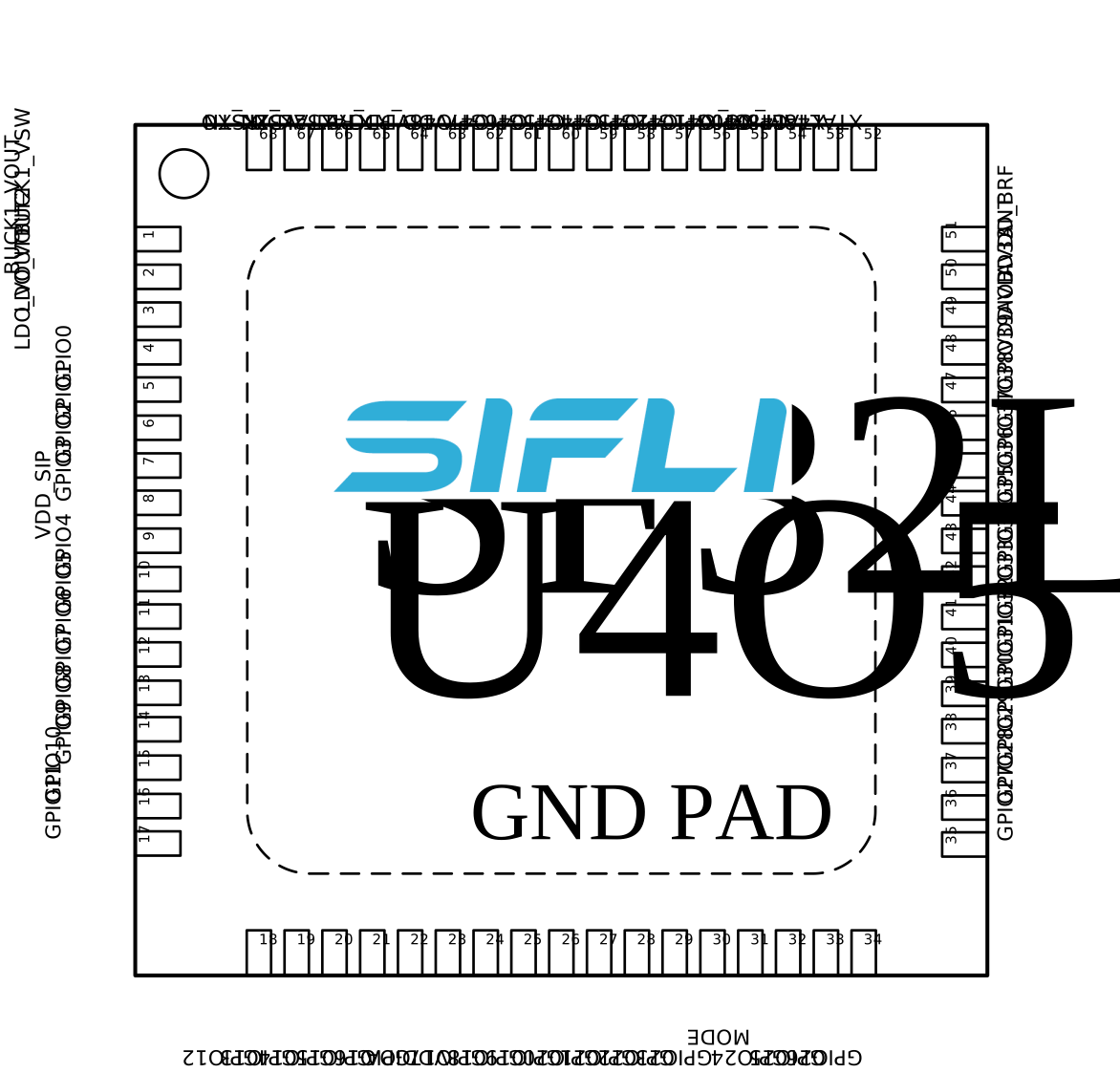
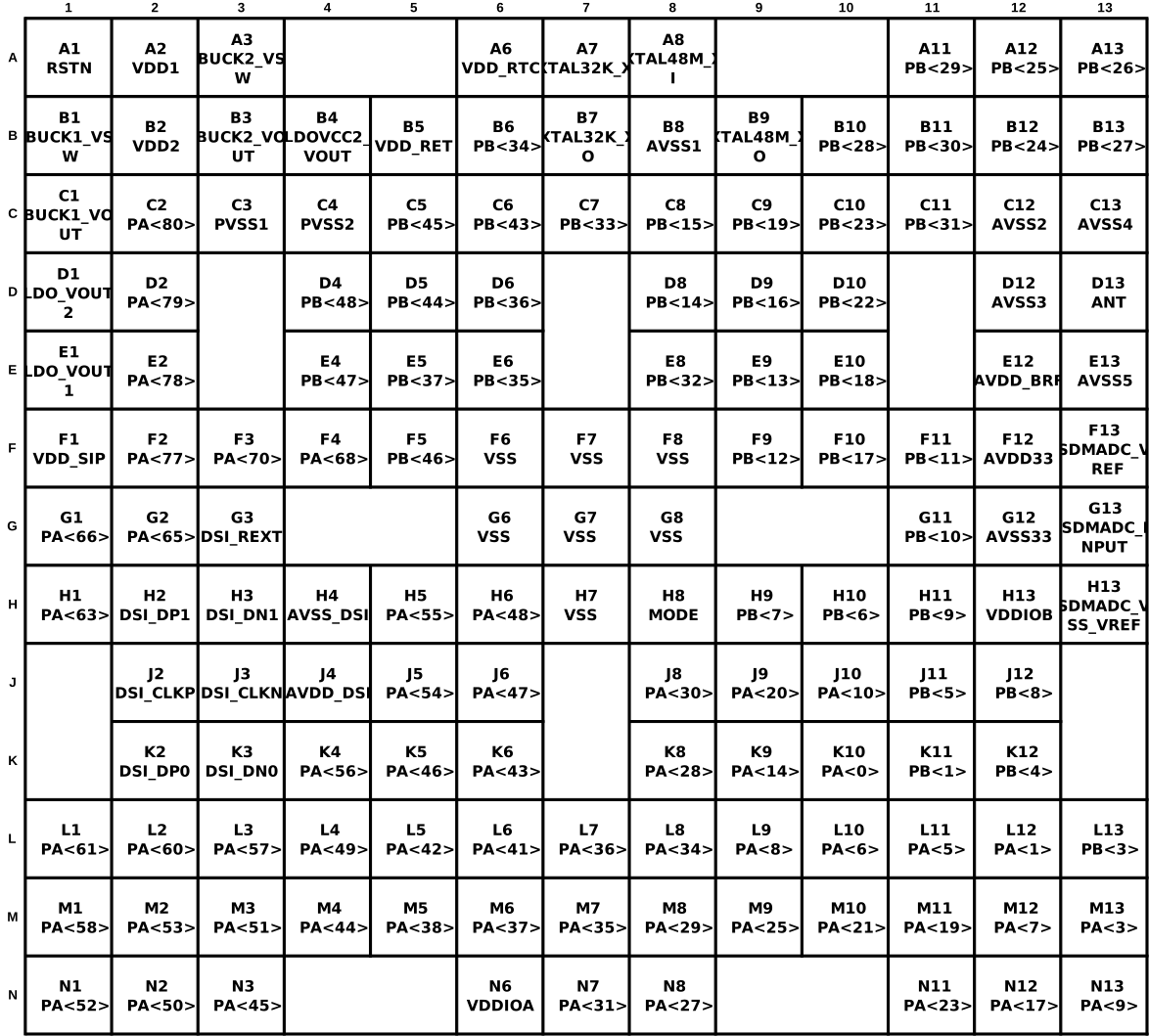
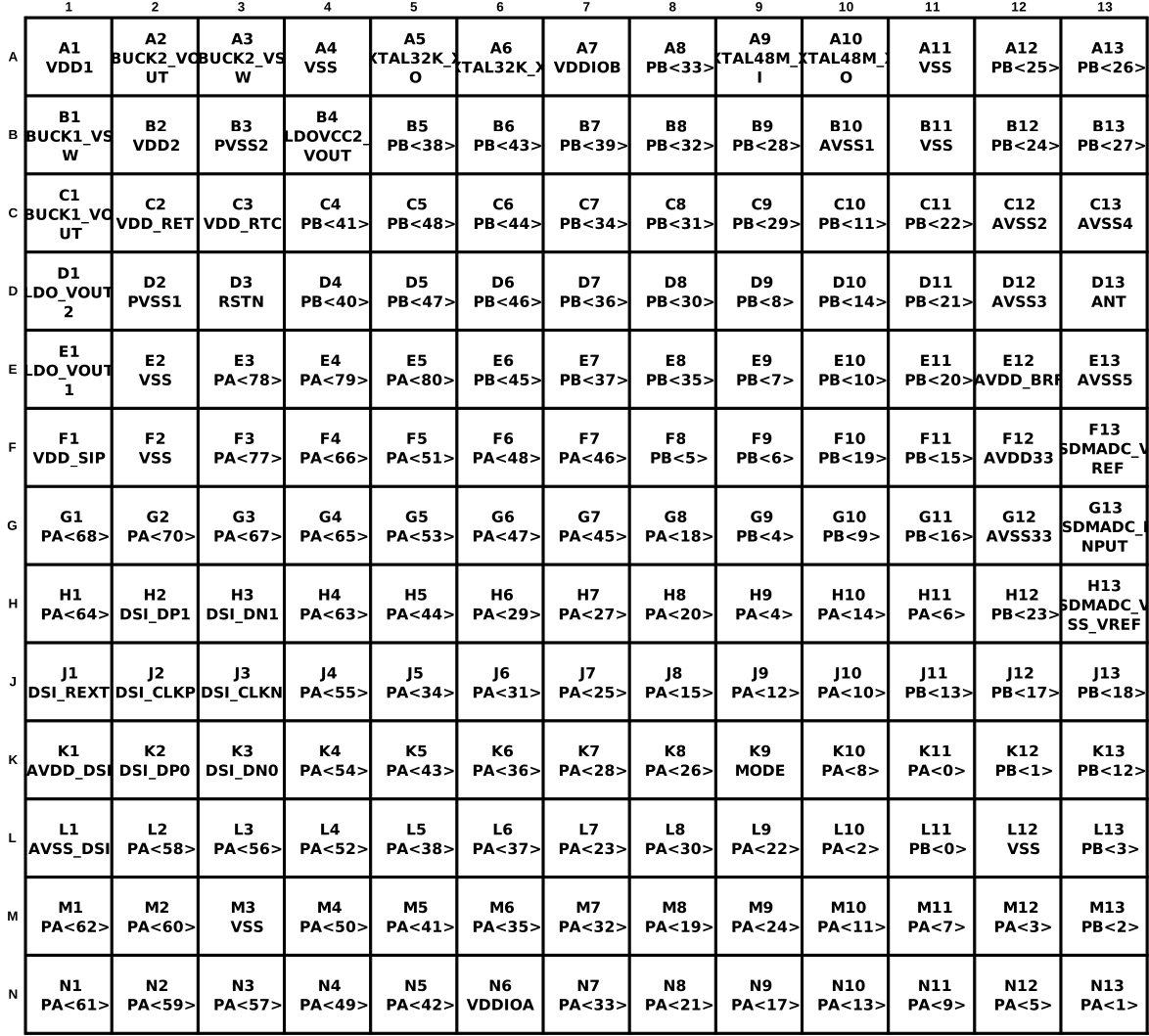
Legacy BGA169 pin maps
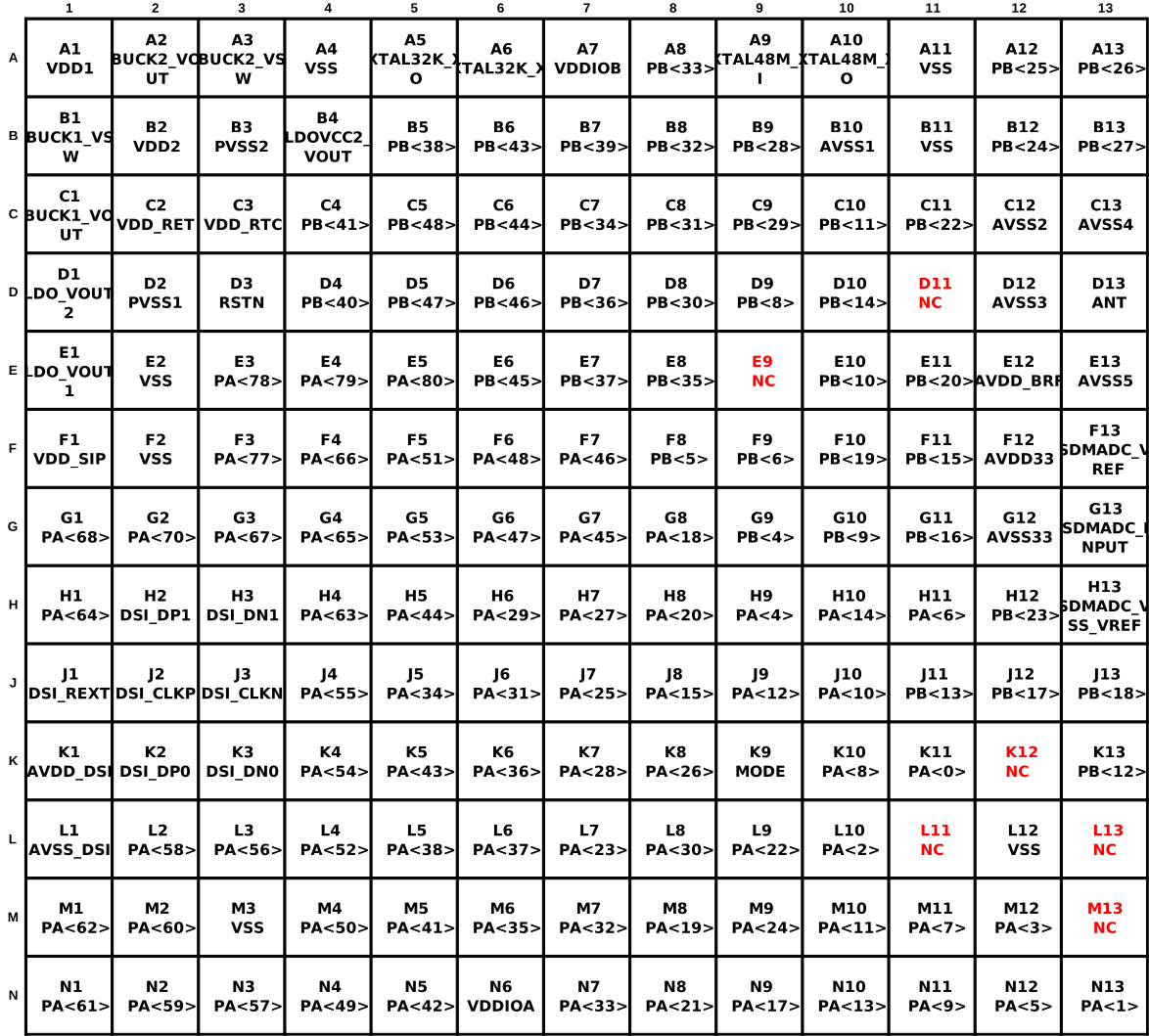
SiFli identifies SF32LB557V8N6 as end-of-life (EOL). Its ball map is retained below for existing-design review, not as a recommendation for a new design. SF32LB557VD3A6 uses a different BGA169 ball map: D11, E9, K12, L11, L13, and M13 are NC. Check the exact part's map; identical package dimensions do not imply pin compatibility.
3.3. Major Hardware Features
- QFN68L, BGA145, and BGA169 package options.
- Dual 48 MHz and 32.768 kHz crystal design requirements.
- Low-power Bluetooth 5.2 transceiver, RF matching, and antenna layout requirements.
- OPI PSRAM, QSPI NOR/NAND Flash and PSRAM, SDIO eMMC or Micro SD interfaces; co-packaged memory varies by exact part number.
- MIPI DSI, SPI/QSPI, MCU8080, and JDI display options.
- Wake button, vibration motor, wake interrupt, GPADC, sensor, and external Bluetooth audio design guidance.
- DBG-UART, SWD, production flashing, and crystal calibration support.
3.4. Typical Applications
Typical target applications include wearable bands, smart mobile devices, smart-home products, and other low-power AIoT designs.
4. Design at a Glance
4.1. Engineering Summary
| Topic | Design Focus |
|---|---|
| Package | Choose QFN68L or BGA package before pin planning and PCB stack-up. |
| Power | Review PMU rails, other power pins, required capacitors, POR/BOR/reset, and BUCK mode. |
| Clock | Use 48 MHz and 32.768 kHz crystals that meet CL, ppm, and ESR requirements. |
| RF | Keep matching network close to the chip and preserve a clean 50 ohm antenna path. |
| Memory | Plan volatile OPI/QSPI PSRAM separately from boot and persistent storage on QSPI Flash or SDIO eMMC/Micro SD; confirm package and boot-mode support. |
| Display | Select MIPI DSI, SPI/QSPI, MCU8080, or JDI early because pin groups and layout differ. |
| Production | Reserve DBG-UART, SWD, boot-mode, power, and RF/crystal calibration access. |
4.2. Hardware Design Flow
- Confirm package, memory strategy, display interface, and low-power target.
- Define the power tree, PMU rails, BUCK/LDO behavior, and reset circuit.
- Select crystals, RF matching topology, and antenna layout constraints.
- Assign memory, display, wake, sensor, audio, debug, and production-test pins.
- Lock PCB stack-up, fanout, impedance, ESD, RF, and high-speed interface constraints.
- Review the Section 7 checklist before schematic freeze, layout release, and EVT.
4.3. Review Evidence Pack
Before EVT, archive the datasheet/user-manual versions, package drawing, schematic PDF, PCB stack-up, impedance report, DRC/ERC reports, power tree, boot-mode table, RF layout screenshots, crystal layout screenshots, memory/display routing screenshots, and production test-point plan.
4.4. Using the Checklists
This guide includes two levels of checklist coverage. The short checklist in Section 7 gives the highest-risk items for a quick engineering self-check. The Schematic Checklist (Section 5.8) and Section 6.4 of the PCB Layout Guidelines reproduce SiFli's complete, item-by-item SF32LB55x Schematic & PCB Checklist (V1.0, 2026-01-21), published alongside the hardware design materials on SiFli's wiki, spanning the 551/555/557 devices and the SS6600A8 variant.
Each check point lists which variant group(s) it applies to and whether it is Required (must pass before release) or Optional (recommended if the feature is used). Colored text and text with a yellow background preserve the source workbook's review emphasis; the workbook doesn't state a reason for each highlight, so treat these marks as additional review flags, not as replacements for any non-highlighted item in the same table.
Run the Schematic Checklist during schematic review, before PCB layout begins. Run the PCB layout checklist (Section 6.4) during layout review, before Gerber release. In practice, each pass is usually performed twice: first by the design engineer, then by an independent reviewer before design freeze or manufacturing release.
For best results, treat the checklist as a sign-off record rather than a reading checklist:
- Confirm the exact target part number and package first.
- Mark every item as pass / fail / not applicable during review instead of reading the table passively.
- Cross-check display, storage, wake-up, and low-power rows against the matching hardware design guide sections.
- Record package-specific assumptions — especially BGA vs. QFN, DSI vs. SPI display, and QSPI2/QSPI3 storage usage — in the review notes.
| Field | Value |
|---|---|
| Customer name | |
| Customer design name | |
| Submission date for review | |
| Initial reviewer | |
| Initial review date | |
| Follow-up reviewer | |
| Follow-up review date |
| No. | Version | Date | Release Notes |
|---|---|---|---|
| 1 | V1.0 | 2026-01-21 | Initial release of the Schematic & PCB Checklist document |
Continue the Design Guide
The full guide continues across the pages below. Each covers one stage of the design process and can be reached from here.
- Schematic Design Guidelines — power system, boot mode, clock generation, RF, storage interfaces, display and touch interfaces, and wake/GPADC/manufacturing interfaces
- Schematic Checklist — item-by-item schematic review checklist (Section 5.8)
- PCB Layout Guidelines — footprint, stack-up, general PCB rules, interface routing, and the item-by-item PCB layout checklist
- Design Review Checklist and References — release checklist, related documents, appendices, and revision history
Last updated: