Configure the Watchdog
The SiFli SDK documents watchdog behavior at two layers: the hardware watchdogs exposed by the HAL and the RT-Thread watchdog driver used by applications. Instance names, reset scope, and clock options differ by family; use the comparison below and verify the target SDK configuration before relying on a particular behavior.
Table: Watchdog behavior documented by family
| Family | HAL watchdog behavior | Clock behavior stated in the HAL guide | |---|---| | SF32LB52x | The HAL guide describes dedicated HCPU and LCPU watchdogs that can interrupt or reset their own subsystem, plus a system-level IWDT that resets the entire chip. | The counter description uses a 32K clock; the guide does not state a separate 52x clock-selection option. | | SF32LB55x | HCPU WDT1 and LCPU WDT2 can interrupt; their hardware reset is limited to the corresponding subsystem. The system IWDT cannot interrupt but can reset the entire chip. | Selectable RC10K or 32K LXT. | | SF32LB56x / SF32LB58x | The HAL guide says WDT1/WDT2 have the added ability to reset the entire chip. | RC10K; the clock is no longer sourced from the 32K low-power clock. |
Scope of the RT-Thread usage guide
The Watchdog Usage Guide is published under the sf32lb52x path, but its text explicitly names SF32LB55X. Treat its 30-second default, IDLE-thread feeding, sleep behavior, and application reset sequence below as guidance for the documented 55x setup, not as a family-wide guarantee. Verify these details against the target family's source and generated configuration.
Enable and configure the watchdog
Run sdk.py menuconfig in the project directory and enable the watchdog option under the RT-Thread device-driver configuration. The exact menu label can vary with the SDK release; use the target family's source page and confirm the generated rtconfig.h before building.
The linked Watchdog Usage Guide shows two separate settings:
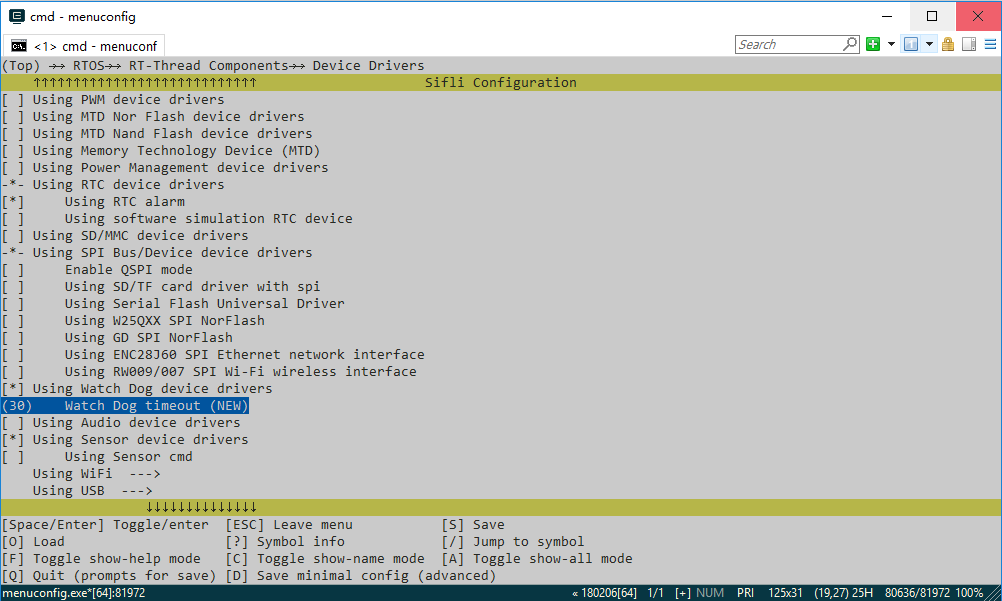
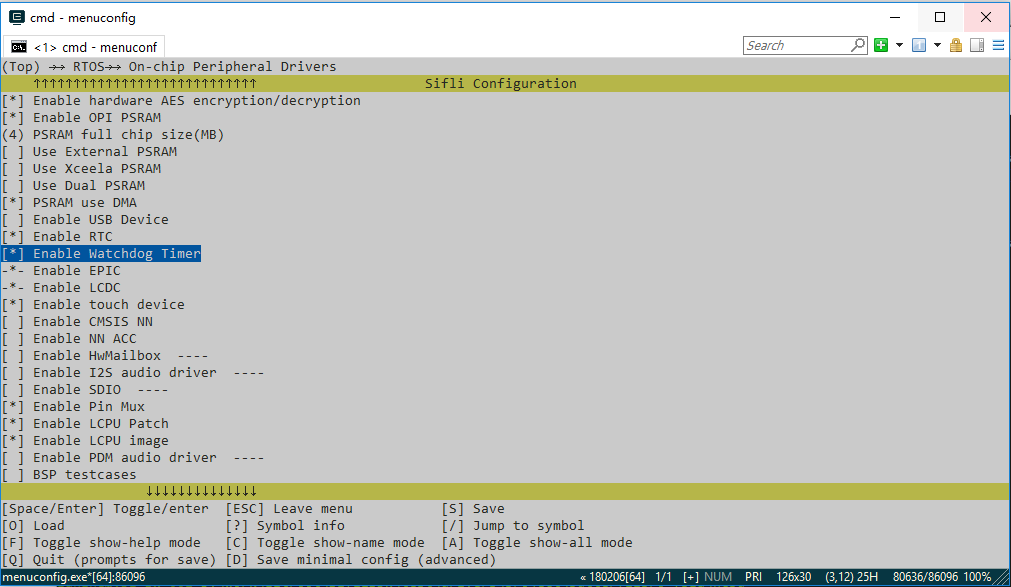
RTOS → On-chip Peripheral Drivers → Enable Watchdog Timerenables the chip's hardware watchdog timer.RTOS → RT-Thread Components → Device Drivers → Using Watch Dog device driversenables the RT-Thread driver.
For the 55x setup described in the linked guide, the documented default timeout is 30 seconds. In the driver menu, (30) Watch Dog timeout (NEW) selects a different value. Confirm the default for the target family in menuconfig, and keep the generated configuration with the firmware image.
The figures below show the menu location and timeout field from the linked guide. Because that guide's URL path and its stated chip family differ, treat the screenshots as illustrations only; check the target project's own menuconfig output for the actual menu path and default.
Feeding policy
The system feeds the watchdog from the RT-Thread IDLE thread. If application threads do not run continuously for longer than the configured timeout, no additional application code is required.
If a high-priority thread must run continuously longer than the timeout, feed the watchdog from that thread with:
Do not add an unconditional feed loop that masks a scheduler stall or a deadlock. The feed point should represent healthy progress in the work being supervised.
Sleep and reset behavior
- Entering
StandbyorHibernatedisables the watchdog; it is enabled again after wake. - In the other sleep modes the watchdog continues running, so the system must wake and feed it before the timeout expires.
- HCPU uses the system watchdog. A timeout restarts the entire chip.
- LCPU uses the LCPU-subsystem watchdog. A timeout first generates an interrupt; the interrupt handler then triggers a software restart of the entire chip.
Validation sequence
- Record the chip family, SDK revision, timeout, feeding owner, and sleep mode.
- Verify that a healthy workload reaches the intended feed point.
- Stop the feed path deliberately and confirm the expected reset scope and boot behavior.
- Repeat from every supported sleep mode, especially
StandbyandHibernate. - Retain the reset observation and any boot-time diagnostic evidence with the product recovery test.
Official sources
- Watchdog Usage Guide (English; published under the SF32LB52x path, body names SF32LB55X)
- Watchdog Usage Guide (Chinese; same SF32LB52x path, body names SF32LB55X)
- SF32LB52x HAL WDT guide (English)
- SF32LB55x HAL WDT guide (Chinese; includes 56x/58x comparison notes)
Separate family-specific application-note pages at sf32lb55x/app_note/watchdog.html, sf32lb56x/app_note/watchdog.html, and sf32lb58x/app_note/watchdog.html remain unverified. Search and direct-open results were inconclusive; they do not establish that these routes return 404.
Last updated: