Bluetooth PAN
Overview
Bluetooth PAN (Personal Area Networking) lets an SF32 device reach an IP network over a Classic Bluetooth link, typically using a phone's tethering service for internet access. This can avoid a dedicated Wi-Fi radio. PAN is one of the Classic Bluetooth profiles listed in Bluetooth Overview and one of the OTA transport options covered in OTA and DFU.
Consider PAN for occasional or moderate IP traffic such as weather queries, time synchronization, cloud API calls, voice-assistant traffic, and firmware downloads. PAN can avoid a dedicated Wi-Fi subsystem when its cost, board area, integration effort, and power draw outweigh its value for the use case. Assess applicable RF compliance requirements for the selected hardware and final product.
How Bluetooth PAN Works
The Bluetooth SIG defines PAN as a Classic Bluetooth (BR/EDR) profile. It carries Ethernet-style packets over a Bluetooth ACL link using BNEP (Bluetooth Network Encapsulation Protocol), which runs over L2CAP rather than RFCOMM. PAN requires BR/EDR and a compatible PAN implementation; BLE support is not itself a requirement, so Classic-only hardware can also implement PAN.
PAN does not run over BLE. However, the separate Internet Protocol Support Profile (IPSP) supports IPv6 over BLE. That protocol capability does not establish IPSP support in SiFli-SDK or a phone's hotspot service. The BLE comparison below concerns an application-level GATT relay, not IPSP.
The profile defines three roles:
| Role | Function |
|---|---|
| NAP (Network Access Point) | Bridges connected Bluetooth devices to an external network, forwarding packets between the Bluetooth piconet and that network. Typically the phone, when using its tethering/Personal Hotspot feature. |
| PANU (PAN User) | The client role. Connects to a NAP (or GN) device and uses its network access. This is the role SF32 devices use. |
| GN (Group Ad-hoc Network) | Forwards packets between connected PANU devices without providing outside network access — used for ad-hoc device-to-device networking rather than internet access. |
A PANU can find nearby devices through inquiry and use SDP to identify their PAN service and role. The Networking indication in Class of Device is a discovery hint, not proof that a usable NAP service is available. After ACL and BNEP setup over L2CAP, the NAP forwards traffic to its external network through the bridging or routing arrangement provided by its implementation. A NAP can be a phone or a LAN gateway, as described by the PAN specification. Either peer can terminate the connection; in the phone-tethered design described here, changing the sharing state may require reconnection.
Why Use PAN Instead of Wi-Fi
| Approach | Good Fit When | Tradeoff |
|---|---|---|
| Bluetooth PAN | Product already uses dual-mode Bluetooth, needs occasional/moderate IP traffic, and a companion phone is normally nearby. | Throughput and range depend on BR/EDR and the NAP's upstream connection. A phone-tethered design depends on that phone; other designs can use a non-phone NAP gateway. |
| Dedicated Wi-Fi radio | Product needs sustained high-throughput or phone-independent connectivity. | Adds radio, antenna, integration work and a power budget. Assess applicable RF compliance requirements for the chosen radio/module and final product. |
| BLE GATT → companion app → Internet | Product needs small data exchanges and the app can relay them to the cloud. | This custom relay is not a direct IP link for the device. BLE IPSP is a separate option whose device-stack and gateway support must be verified; it is not PAN. |
For products already committed to dual-mode Bluetooth for audio, GATT services, or Classic profiles, PAN is frequently the lowest-incremental-cost way to add internet access without a second radio subsystem — provided the product's use case tolerates being dependent on a nearby, tethering-enabled phone.
iOS Data Transport: BLE Relay, Classic Bluetooth, and PAN
It is important to separate three different iPhone connectivity designs. Saying “Classic Bluetooth requires MFi” without qualification is too broad: iOS supports standard Bluetooth profiles, and Personal Hotspot itself can use Bluetooth. The restriction applies when an iOS app needs a custom data channel to a Bluetooth Classic accessory through Apple’s External Accessory/iAP path. Apple documents that External Accessory communicates with MFi accessories over Bluetooth, while its technical Q&A states that BLE accessories use Core Bluetooth instead and are not required to be MFi compliant.
| Design | Device-to-phone path | iOS product implication | Internet throughput and engineering tradeoff |
|---|---|---|---|
| BLE → app → Internet | Custom GATT protocol; the iOS app receives device data and forwards it to the cloud. | BLE can use Core Bluetooth without the External Accessory MFi path. The app must own pairing, framing, retry, background behavior, and the cloud relay. | BLE payload capacity and scheduling are limited by connection parameters and iOS/app behavior. This route is often appropriate for small, intermittent data, but it is not a general IP link and can become the practical bottleneck for continuous or data-heavy traffic. |
| Custom Classic Bluetooth → app | A custom Bluetooth Classic accessory data channel to an iOS app. | The External Accessory framework is for MFi accessories; Apple states that this framework is limited to MFi hardware. Standard supported profiles are a separate case. | This route requires an MFi accessory and its supported accessory protocol, plus app integration and product qualification. It does not by itself provide direct IP networking to the device. |
| Bluetooth PAN → phone hotspot → Internet | Standard PANU-to-NAP networking; SF32 uses the phone's Bluetooth Personal Hotspot/tethering service. | The device uses the phone's tethering service rather than a custom app-to-accessory transport. The product still must qualify the phone, carrier, and tethering behavior. | SF32 runs its own IP client without an app relay. This does not establish a speed or energy advantage over BLE. Compare delivered payload throughput, update time, and energy on the intended phones, using the same payload and server. Results depend on the Bluetooth link, phone policy, upstream network, and endpoint. |
For a voice assistant, OTA client, or other product that needs sustained streaming or direct HTTP/WebSocket traffic, PAN can avoid putting a BLE relay app in the middle, but treat it as an iOS network-path candidate only after testing the target iPhone and SDK configuration. The SiFli v2.5.1 example also enables A2DP to work around a documented iOS issue with connecting PAN alone; A2DP is not a PAN protocol requirement. PAN does not replace an app where the product needs configuration UI, user authentication, notifications, or local control; it simply keeps the application data plane from being constrained by that app relay. The SF32 Xiaozhi Voice Assistant is a working example of this architecture.
Device Support on SF32
For SF32, select a family with Classic Bluetooth support and verify the PAN stack, SDK revision, and target-board configuration. The families below that support PAN use dual-mode Bluetooth; this is a property of those SF32 devices, not a PAN protocol requirement.
| Family | Bluetooth Capability | PAN Support |
|---|---|---|
| SF32LB52x | Dual-mode Bluetooth | Yes |
| SF32LB55x | BLE only | No — PAN requires Classic Bluetooth |
| SF32LB56x | Dual-mode Bluetooth | Yes |
| SF32LB57x | Dual-mode Bluetooth | Verify the PAN stack and target board; not listed in the pinned v2.5.1 PAN example |
| SF32LB58x | Dual-mode Bluetooth | Yes |
See Bluetooth Overview for the broader BLE-vs-dual-mode device selection guidance.
SiFli-SDK's PAN Example
SiFli-SDK ships a working PANU implementation at example/bt/pan, supported on the eh-lb52x, eh-lb56x, eh-lb58x, and the sf32lb52/56/58-lcd board series. The example connects to a phone's PAN (NAP) service and then uses Finsh shell commands to demonstrate real network use — including a weather command that fetches current conditions over the established PAN link. The README screenshot shows a weather-service response with id, name, country, path, timezone, timezone_offset, txt, code, temperature, and last_update; its sample is Chongqing (CN), Asia/Shanghai (+08:00), 多云 (Chinese for “cloudy”; code 4), temperature 10, updated 2025-01-13T15:54:09+08:00. These are application-level values, not PAN/BNEP framing, and they may vary.
At startup, the example enables Bluetooth inquiry and page scan so a phone can discover and pair with the device under its default Bluetooth name, sifli_pan.
For HTTPS, follow the certificate setup in the v2.5.1 PAN README. Default CA certificates are under external/mbedtls_228/certs/default; place any additional required CA certificates in external/mbedtls_228/certs. They must be PEM, not DER: check the contents for -----BEGIN CERTIFICATE-----, rather than relying on the filename extension. With PKG_USING_MBEDTLS_USER_CERTS enabled in proj.conf, the build combines the files in that directory into ports/src/tls_certificate.c. Review the trust anchors for the actual server. A successful PAN connection does not prove TLS certificate validation; check the server identity and the device time where certificate validity checks require it.
The README spells this package directory mbedtls_288, but its screenshots and the v2.5.1 certificate-generation implementation use mbedtls_228. The paths above follow the implementation. It accepts certificate content only when the first line starts with -----BEGIN CERTIFICATE; keep certificates in that form and check the build warnings for skipped files.
| Command | Effect |
|---|---|
pan_cmd conn_pan |
Connect to PAN after the phone's network sharing is enabled. |
pan_cmd ota_pan |
Download and install the firmware image specified in main.c over the PAN link. |
pan_cmd set_retry_flag 1 / 0 |
Enable or disable automatic PAN reconnection. |
pan_cmd set_retry_time N |
Set the maximum number of autoconnect retry attempts. |
pan_cmd autoconnect |
Manually trigger a reconnect attempt after the phone drops and re-enables sharing. |
Before running the example, check these settings against the pinned README and your target:
- Enable
CONFIG_BLUETOOTH,CONFIG_BT_PROFILE_CUSTOMIZE,CONFIG_CFG_PAN, andCONFIG_BSP_BT_CONNECTION_MANAGER. The example also enables A2DP to work around the documented iOS problem with connecting PAN alone; A2DP is not a PAN protocol requirement. CONFIG_BT_FINSHenables the optional Bluetooth control commands. Keep the shell facilities required by the commands you intend to test.- Set
CONFIG_BSP_BLE_NVDS_SYNCaccording to where Bluetooth runs: the README enables it for HCPU and disables it for LCPU. Do not copy a configuration from a different processor allocation unchanged. - For reconnecting to the last device, check
CONFIG_BT_AUTO_CONNECT_LAST_DEVICEandCONFIG_PKG_USING_FLASHDB. Validate persistence across reboot, and use the retry controls above to bound reconnection attempts rather than retrying indefinitely.
Mobile Phone OS Support and Qualification
The phone is the PAN NAP and part of the product's network path, not merely a provisioning tool. Treat its operating system, handset model, carrier plan, and tethering policy as supported-product configuration. A Bluetooth pairing that succeeds is not sufficient: the phone must expose a Bluetooth tethering/PAN service and route traffic after the PANU connects.
| Mobile OS | What the platform documents | SF32 bring-up guidance | Product qualification boundary |
|---|---|---|---|
| iOS / iPadOS with cellular service | Apple Personal Hotspot documentation documents Bluetooth as a connection method and states that Personal Hotspot shares the phone's cellular Internet connection. | Follow the SiFli Xiaozhi iOS path: use a phone with active cellular service, enable Personal Hotspot before pairing, keep Bluetooth enabled, and pair/connect to the SF32 device. If sifli-pan is not visible, the SiFli guide notes that restarting the phone can help. |
Personal Hotspot availability, data limits, and the number of connected devices depend on the carrier and iPhone model. Test every supported iOS/iPadOS release, handset class, and carrier plan; do not infer support from Wi-Fi hotspot operation alone. |
| Android | Android Help states that most Android phones can share mobile data by Bluetooth: pair first, configure the other device's Bluetooth network connection, then enable Bluetooth tethering. | Enable Bluetooth tethering before pan_cmd conn_pan. Setting names and menu locations vary by vendor, Android release, and enterprise policy; record the exact path used for each qualified phone. |
Google describes this as available on most, not all, Android phones. Carriers can limit or charge for tethering, and vendors can hide or alter the control. Test the shipping handset/OS/carrier combinations rather than relying on an Android version alone. |
| HarmonyOS and other Android-derived mobile systems | This guide has no platform-wide PAN-support assertion for these systems. Their Bluetooth and tethering implementations may be derived from Android but can differ by model, market, release, carrier configuration, or device-management policy. | Look for a Bluetooth-tethering control, pair the phone and SF32 device, then prove actual IP traffic with the PAN example. | Treat each exact handset, OS build, region, and carrier as qualification required until it passes the same validation record used for Android. Do not advertise support based only on brand or Bluetooth pairing. |
Phone-Side Setup
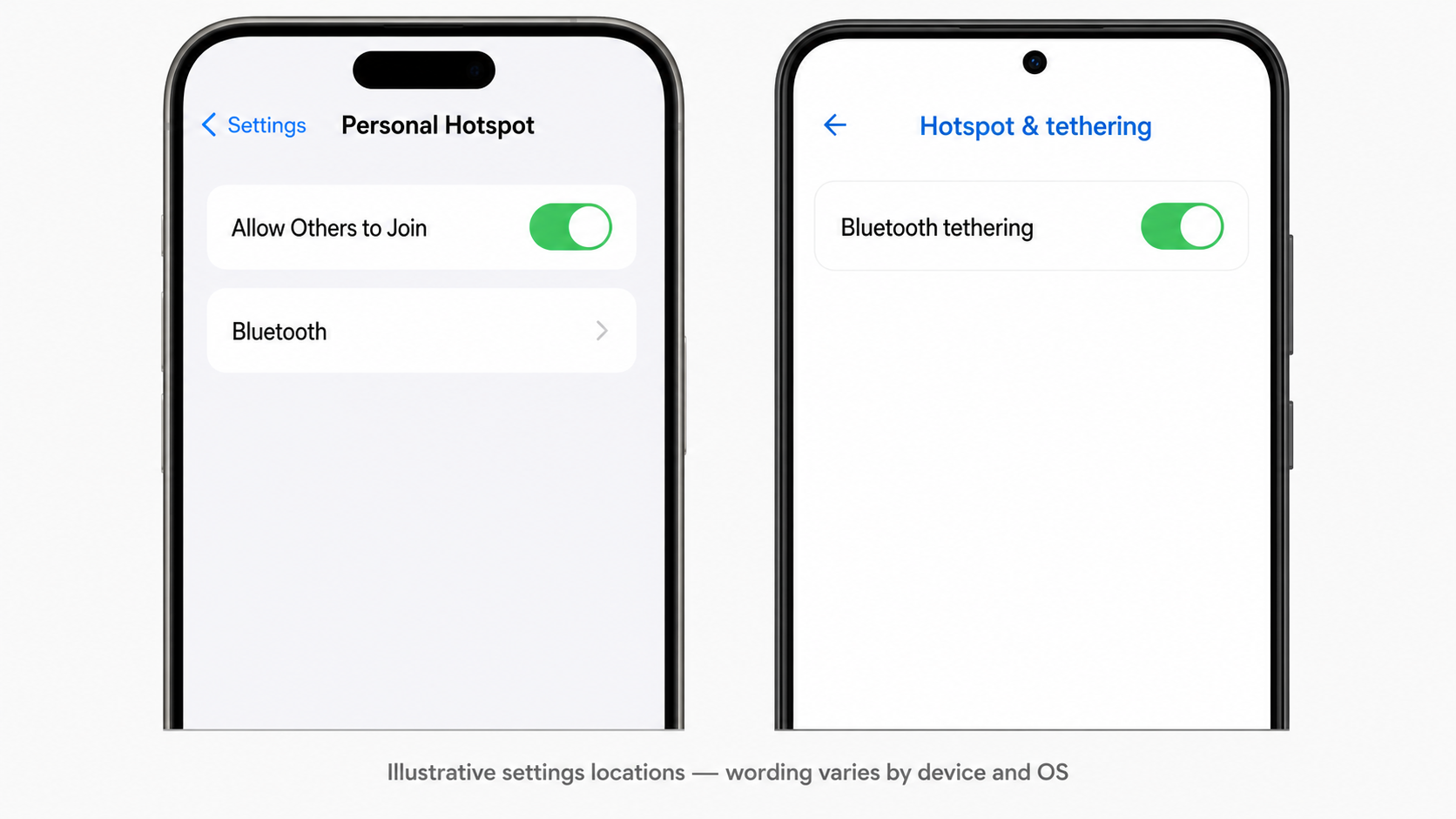
This is an illustrative settings reference, not a literal operating-system screenshot. The wording and menu location vary by iOS/iPadOS version, Android vendor, and phone-management policy; look for Allow Others to Join on iOS/iPadOS or Bluetooth tethering on Android. The SiFli v2.5.1 iOS screenshot also shows Maximize Compatibility enabled. Treat that as an example phone setting, not a PAN requirement; verify it on each target device rather than assuming it is necessary.
Use this sequence for each phone under test:
- Verify the phone's upstream connection. Apple's Personal Hotspot shares cellular data; confirm that the carrier permits tethering. Some Android phones can also share a Wi-Fi connection, but verify that capability on the exact model and OS build.
- Enable the phone's Bluetooth tethering or Personal Hotspot function before requesting PAN from the SF32 device.
- Pair the phone and device, keeping the phone discoverable when the OS requires it.
- Run
pan_cmd conn_pan, then prove an IP transaction such as the example'sweathercommand—not just a successful Bluetooth connection. - Disable sharing, sleep/wake the phone, and move the phone out of range; confirm that the product's intended reconnect behavior works.
If sharing is enabled only after the Bluetooth connection is already established, reconnect PAN explicitly with pan_cmd conn_pan.
Define a Shipping Phone Support Matrix
For a consumer product, publish supported phone model + OS version + carrier/region combinations, not simply “iOS” or “Android.” Record at least the following for each candidate: phone model, OS build, carrier, active cellular service, SIM/eSIM status, tethering setting name, initial connection time, reconnect behavior after screen lock and radio loss, sustained traffic result, and any user action needed to restore service. Re-run this matrix whenever the app, PAN firmware, phone OS, or carrier profile changes.
PAN-Based OTA Delivery
The PAN example ships with OTA enabled by default: pan_cmd ota_pan downloads and installs a firmware image over the same Bluetooth PAN link already used for network traffic, using the DFU_PAN OTA path documented alongside SiFli-SDK's firmware upgrade service. This is a good fit for products that already rely on PAN for data and don't want a second OTA transport — see OTA and DFU for how PAN compares to BLE and other update transports, and plan rollback/recovery behavior the same way regardless of transport.
The README identifies a separate build failure when a selected target has no suitable OTA ptab.json. Its screenshots show disabling the DFU subproject and middleware firmware-update support to test the non-OTA example. That diagnostic removes OTA; it is not a way to ship a product that requires updates. Supply and validate the correct partition layout and update configuration before enabling the OTA path.
PAN provides transport, not proof of firmware authenticity or recovery. For release, validate server authentication, image authenticity and integrity, target/version compatibility, and interruption recovery. Exercise both lost connectivity and power loss, and verify the bootloader's actual recovery or rollback behavior rather than assuming the download command supplies it.
A Real SF32 Product Using PAN
The SF32 Xiaozhi Voice Assistant project is a concrete, working example of PAN on SF32: it uses Bluetooth PAN to obtain internet access through a paired phone, then streams voice interaction to a cloud service over that connection. It's a useful reference for how a full product wires PAN networking, WebSocket/HTTP application traffic, and the phone-tethering dependency together end to end.
Troubleshooting
The README also flags Bluetooth address allocation as a diagnostic. Inspect the address with nvds get_mac. Only use an OUI allocated to your organization or otherwise authorized for the product, and assign unique device addresses; do not copy another vendor's OUI from a sample. In nvds update addr 6 xxxxxxYYYYYY, YYYYYY is the OUI in reversed byte order and xxxxxx represents the remaining three address bytes. Follow the command's byte-order convention rather than pasting a display-form MAC address unchanged.
CONFIG_NVDS_AUTO_UPDATE_MAC_ADDRESS can overwrite a manual address change. If an authorized test address does not persist, the README recommends disabling that option, rebuilding and reflashing, then setting the address again. This is a test diagnostic, not a production address-allocation policy: validate the intended automatic or factory-programmed policy across reboot before release.
| Symptom | Checks and Actions |
|---|---|
PAN connects but network commands (e.g. weather) fail |
Check BNEP establishment, assigned IP address, route, DNS, endpoint availability and TLS errors where applicable. The README also recommends checking the Bluetooth MAC OUI with nvds get_mac; change it with nvds update addr 6 ... only under an authorized allocation policy. An invalid OUI is not the only possible cause. |
| Phone doesn't see the device, or won't connect | Confirm the phone's tethering/network-sharing is enabled before connecting, and that the device is discoverable (inquiry/page scan active). |
Phone pairs but weather or another IP operation fails |
Pairing does not prove a PAN NAP service. Confirm Bluetooth tethering/Personal Hotspot is enabled and the upstream connection works. For cellular backhaul, check carrier permission; for Android Wi-Fi sharing, verify support on that model/OS. Check the tested combination against the support matrix. |
| PAN drops after phone-side network state changes | This can happen; qualify the behavior on each supported phone. Reconnect with pan_cmd conn_pan or enable pan_cmd set_retry_flag 1, using the retry limit above to bound automatic attempts. |
| OTA over PAN fails partway through | Treat it like any other OTA transport: verify the image URL, partition layout, and rollback behavior per OTA and DFU rather than assuming PAN itself is at fault. |
Bring-Up Checklist
- Verify Classic Bluetooth hardware and a PAN stack/configuration for the exact SDK and board. The referenced example lists SF32LB52x/56x/58x; qualify SF32LB57x separately. SF32LB55x is BLE-only.
- Decide whether PAN's phone-tethering dependency fits the product's connectivity model, or whether a dedicated Wi-Fi radio is actually needed.
- Bring up
example/bt/panon the target board and confirm phone-side tethering setup (iOS/iPadOS Personal Hotspot or Android Bluetooth tethering). - Validate a real PAN connection and at least one network operation (e.g. the example's
weathercommand) end to end. - Qualify every intended phone model, OS build, region/carrier plan, and tethering setting path; do not ship with a generic “iOS/Android supported” claim.
- Verify the device's Bluetooth MAC OUI is valid before relying on network functionality.
- If using PAN for OTA, test the full
pan_cmd ota_panpath, including rollback behavior, before shipping. - Design the reconnect/autoconnect behavior (
set_retry_flag,set_retry_time) around how often the product expects the phone to be in range.
Key Takeaways
- Bluetooth PAN carries IP/Ethernet-style traffic over BR/EDR using BNEP over L2CAP. It does not require BLE support. IPv6 over BLE uses the separate IPSP profile, not PAN, and requires verified stack and gateway support.
- SF32 devices use the client PANU role, typically connecting to a phone acting as NAP through its tethering/Personal Hotspot feature.
- On iOS, BLE accessories can use Core Bluetooth without MFi, but a custom app-to-accessory Bluetooth Classic data channel through External Accessory/iAP is an MFi path. PAN instead uses the phone's tethering service, letting the SF32 device use its own IP client rather than a BLE-app relay.
- The referenced PAN example lists SF32LB52x/56x/58x targets. SF32LB57x has dual-mode hardware but requires separate PAN-stack and board validation; SF32LB55x is BLE-only and cannot run PAN.
- SiFli-SDK's
example/bt/panis a working reference implementation, including Finsh commands for connect, reconnect, and PAN-based OTA delivery. - Phone-tethered PAN suits occasional or moderate IP traffic when a phone is normally nearby. For sustained high throughput or phone-independent operation, evaluate dedicated Wi-Fi or another independent network path; a non-phone NAP gateway is also possible.
Last updated: